Decide the model first: buy printed transfers and press them, print in-house, or sell gang sheets to other decorators. Printing needs a DTF printer, a powder shaker-dryer, a heat press, a RIP and its computer, in a 20–25 °C room with fume extraction at the curing unit and its own circuit for each heater. Equipment manuals and your ink and powder safety data sheets override any generic list.
The three DTF business models at a glance
| Model | What you buy | Space and services | Choose it when | Not when |
|---|---|---|---|---|
| Buy transfers, press garments | A heat press, garments, and printed transfers from a supplier | A press bench; a 120 V Hotronix Fusion IQ wants a full 20 A circuit | Volume is low or irregular, or you are still testing designs | Same-day reprints are what you sell |
| Print in-house for your own garments | Printer, shaker-dryer, press, RIP and computer, plus film, ink and powder | A ventilated room within the chosen printer’s specified temperature and relative humidity (RH) range, extraction at the curing exit, a circuit per heater | Steady weekly volume and you want control of lead time | Nobody can do the daily white-ink care |
| Sell transfers or gang sheets to others | Everything for in-house, plus cutting, packing and an artwork intake process | As in-house, plus packing and dispatch space | The printer has spare hours beyond your own orders | You cannot check customer artwork before it prints |
Should you buy DTF transfers or print them yourself?
Buying transfers means a supplier prints, powders and cures your artwork, often as gang sheets (many designs on one sheet of film), and ships them for you to press. You need only a press and garments, so you can sell before you own a printer. Printing yourself adds a production line, a room that can take it and someone to look after white ink every working day.
Compare the two over the same order mix, with your own numbers. Use square metres, because supplier sheets and your roll may differ in width:
supplier cost per m²          = sheet price ÷ sheet area + delivery per m²
in-house variable cost per m² = film + ink + powder + energy + labour per m²
break-even m² per month       = monthly fixed costs
                                ÷ (supplier cost per m² − in-house variable cost per m²)
Monthly fixed costs are what you pay whether or not the printer runs: equipment finance or depreciation, software licences, a service contract, your share of rent and the running cost of extraction. Below the break-even area, buying is cheaper on paper; above it, printing is, provided the line has the hours (the capacity method below checks that).
Then weigh what the formula leaves out:
- Lead time. A supplier’s cut-off and shipping set your fastest promise; in-house, your own queue does.
- Reprints. A single replacement transfer costs a supplier order, or a slot on your next sheet.
- Daily care. White ink has to be shaken or circulated every day and the printer left switched on, as the DTF printer maintenance schedule explains.
- Capital. A printer is money committed before the first sale; a supplier is paid per order.
- The building. Space, power and ventilation, covered below, decide whether a line fits at all.
A cautious sequence is to buy transfers until your sales records show steady weekly volume, then run the comparison. For DTF against other methods, see DTF vs DTG vs screen printing vs sublimation; to build the cost record itself, use the per-square-metre pricing guide.
What equipment do you need to print DTF?
A DTF (direct-to-film) transfer is colour ink and a white layer printed in reverse on PET (polyester) film, covered with hot-melt adhesive powder and cured; a heat press then bonds it to the garment. Epson’s list for printing film on its SureColor F1070 shows the minimum: the printer, a heat press, DTF film and powder, a heat-resistant release sheet, a tray and a powder shaker or sieve, plus a mask and eye protection for the powder.
Printers by tier
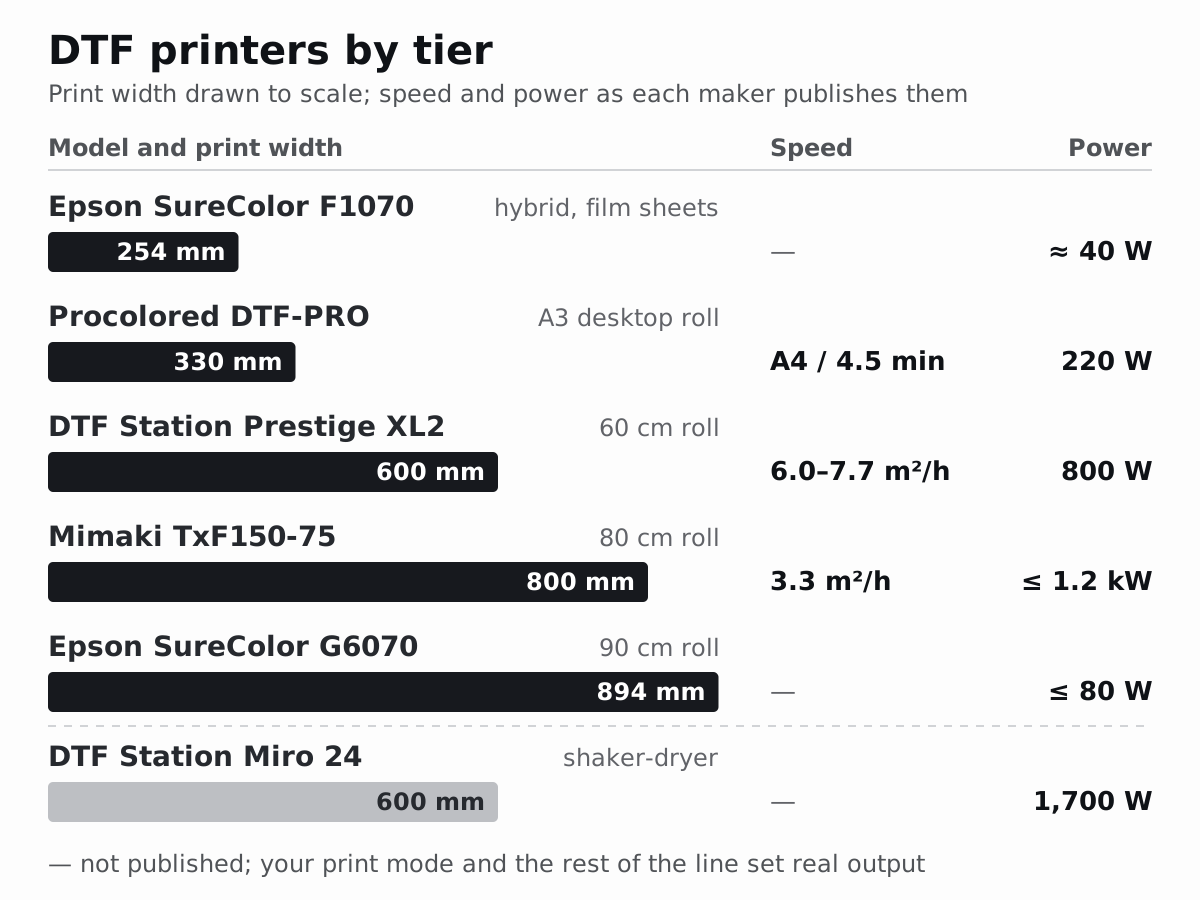
Printers differ mainly in film width, which decides what fits across a sheet, and in speed. Published figures for one named model per tier:
| Tier | Example | Print width | Published speed | Power | Footprint and weight |
|---|---|---|---|---|---|
| Sheet, hybrid direct-to-garment (DTG) and DTF | Epson SureColor F1070 | 254 × 305 mm (10 × 12 in) sheet, small platen | Not in the user’s guide | 100–240 V, 1.4 A; about 40 W printing | 899 × 699 mm (35.4 × 27.5 in), 71 kg (156.5 lb) |
| A3 desktop roll | Procolored DTF-PRO (F13 Pro) | 330 mm (13 in) | One A4 in 4.5 minutes | 220 W, 100–230 V | 750 × 450 mm (29.5 × 17.7 in), 39 kg (86 lb) |
| 60 cm roll | DTF Station Prestige XL2 | 600 mm (23.6 in) | 7.7 m²/h (82.9 ft²/h) at 6 passes; 6.0 m²/h (64.6 ft²/h) at 8 passes | 800 W, 220 V, 3.6 A | 1,660 × 850 mm (65.3 × 33.5 in), 135 kg (297.6 lb) |
| 80 cm roll | Mimaki TxF150-75 | 800 mm (31.5 in) | Up to 35.5 ft²/h (3.3 m²/h), CMYK + white, 720 × 720 dpi, 8 passes | Up to 0.9 kW at 100–120 V, 1.2 kW at 200–240 V | 1,965 × 700 mm (77.4 × 27.6 in), 126 kg (277.8 lb) |
| 90 cm roll | Epson SureColor G6070 | Up to 894 mm (35.2 in) | Not on Epson’s specification sheet | Under 1.0 A; 80 W or less printing | 1,608 × 746 mm (64 × 29 in), 133 kg (295 lb) |
Each speed is the maker’s figure for the stated mode. The mode you sell in, nozzle checks and roll changes bring real output down, so plan with the capacity method below rather than the brochure. A sheet or A3 machine suits samples and short runs. A roll printer can feed film straight into an inline shaker-dryer, as DTF Station pairs its Miro 24 with the Prestige XL2. Wider film also changes what fits across a sheet; the roll width guide compares 30 to 180 cm.
Powder shaker-dryers and curing
The shaker spreads TPU (thermoplastic polyurethane) adhesive powder over the wet print and shakes off the loose powder; a heater then melts what stayed. Take the curing temperature and time from your powder’s sheet: the published settings compared in the peeling and washing guide run from 90 °C to 170 °C (194–338 °F).
| Unit | Film width | Power | Size and weight | Fumes, in the maker’s words |
|---|---|---|---|---|
| DTF Station Miro 24, inline shaker-dryer | Up to 60 cm (24 in) | 1,700 W: 15.5 A at 110 V, 7.7 A at 220 V | 151.3 × 76.6 cm (59.6 × 30.2 in) with its table; 100 kg plus a 15 kg table | A built-in air purifier that “eliminates smoke” |
| Vastex D-100, infrared conveyor dryer for powdered sheets | 46 cm (18 in) belt | 120, 208 or 240 V models | Under 8 ft² (0.74 m²) of floor | Vastex “strongly recommend[s]” an exhaust hood “when curing DTF adhesives” |
Two points stand out. In the 60 cm pairing the curing unit draws more than twice the printer’s power (1,700 W against 800 W), and both makers treat fumes as part of the machine. Sheet work can start with powder shaken by hand over a tray, as Epson describes for the F1070, but never beside the printer: the F1070 guide says “Do not apply powder near the printer.”
Heat presses
Platen size caps print size: the DTF transfer size chart notes that a 15 × 15 in platen leaves about 14 × 14 in usable and that prints near 15 × 18 in need a 16 × 20 in (406 × 508 mm) press. Caps need a hat press with a curved lower platen. Hotronix’s manual for its Fusion IQ asks for a stand of at least 36 × 24 × 29 in (914 × 610 × 737 mm) and, at 120 V, “a full 20-amp grounded circuit”. Air-operated presses also need a compressor. Temperatures, platen checks and the 12–15 second dwell (the time the press stays closed) are in the heat press settings guide.
RIP, layout software and computer
The RIP (raster image processor) converts the print file into ink and white data for one printer model and drives the printer. Some printers come with one: Epson includes Fiery Digital Factory Epson Edition with the G6070, and DTF Station lists neoStampa Delta for the Prestige XL2. Before buying a separate RIP, ask which edition your printer width needs; the DTF RIP comparison lists the questions.
Layout (prepress) software arranges the designs of many orders on a gang sheet before the RIP; the workflow section shows where it sits, and the DTF gang sheet software comparison sets free builders, RIP nesting and prepress tools side by side. For the computer, treat the printer maker’s minimum as the floor. Epson’s for the G6070 is a 3 GHz quad-core processor, 8 GB of RAM and a 50 GB SSD running 64-bit Windows 11, 10 or 8.1.
How much space does a DTF setup need?
Add the footprints of the machines you choose, then the working room their manuals ask for. Mimaki’s manual shows the gap: the TxF150-75 measures 1,965 × 700 mm but needs an installation area of at least 2,965 × 2,700 mm (about 8.0 m² against 1.4 m² for the machine), and two people to load rolls of up to 45 kg. Epson wants the F1070 on a table 600–800 mm high and at least 700 mm deep that carries about 85 kg without wobbling. A press needs its own stand and room to lay a garment flat.
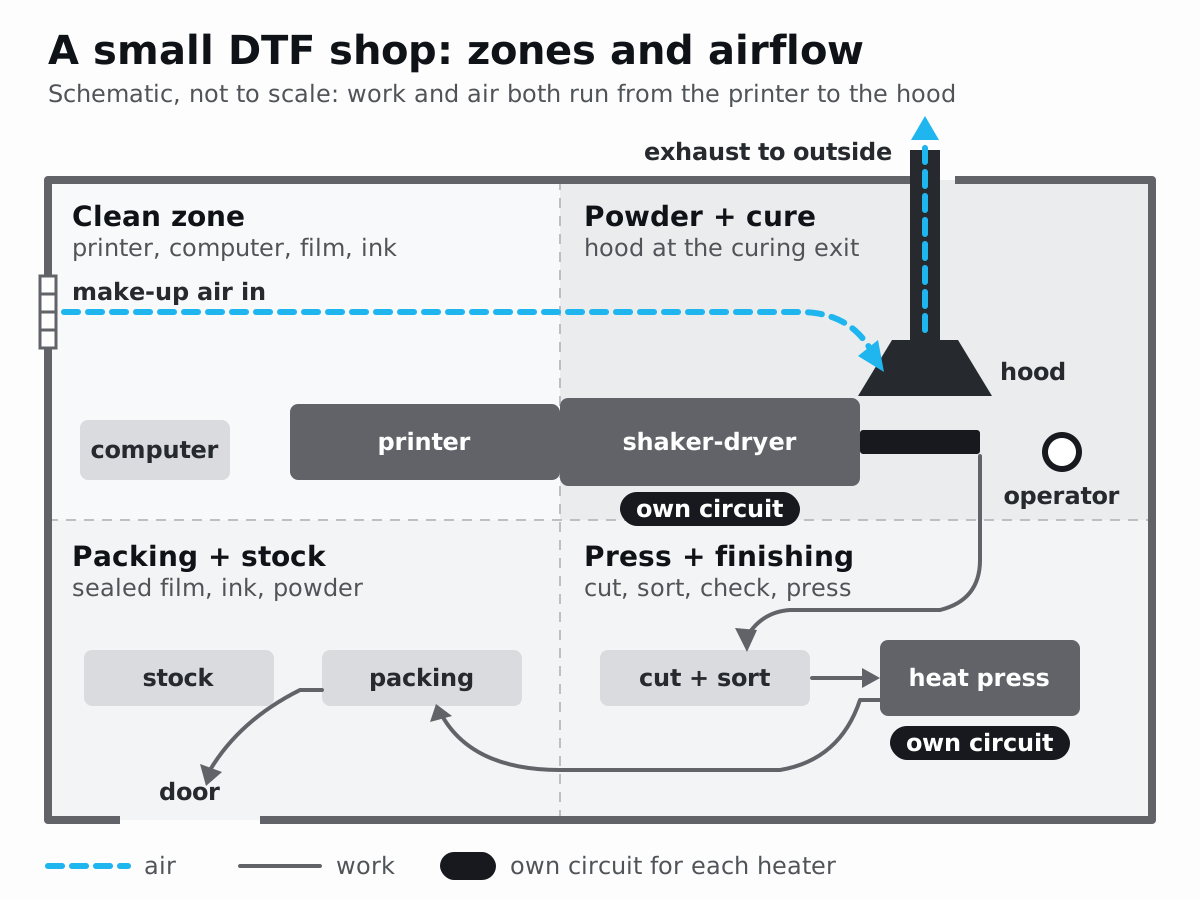
Then split the room into zones, because powder, lint and fumes from the later stages harm the earlier ones:
- Clean zone: computer, printer, film and ink. Mimaki asks for a room “with as little dust as possible” and warns that dust at roll ends can clog nozzles. Hold the temperature and humidity specified for your printer; DTF Station currently lists 35–40 % RH for the Prestige XL2, so confirm the requirement before adopting a 40–60 % target.
- Powder and cure zone. The shaker-dryer, attached to the printer’s output on an inline line or on its own bench, next to the shortest route outside for its exhaust duct. Hand powdering happens here, never at the printer.
- Press and finishing zone. Pressing, cutting, sorting and checks. Garments and offcuts shed lint, so keep this zone away from the printer.
- Packing and stock. Packing near the door; film, ink and powder sealed, dry and away from heaters.
Lay the zones out in the order a job travels, and let the air move the same way: in at the clean end, out through the extraction at the curing unit.
How much electrical power does DTF equipment need?
Heaters, not printers, set the load: the Epson G6070 draws under 1.0 A and the Prestige XL2 3.6 A at 220 V, while the Miro 24 shaker-dryer draws 15.5 A at 110 V and the Fusion IQ press wants a full 20 A circuit of its own at 120 V.
The makers’ wiring rules point the same way. Mimaki asks for each power cable to go into “a power source with an independent breaker”, because cables sharing a breaker may trip it. Hotronix says not to run other high-voltage equipment on the press’s circuit and, if an extension cord is unavoidable, to use one rated for 20 A.
- List every load at your voltage from its nameplate or manual: printer, shaker-dryer, press, compressor, extraction fan, room heating or cooling.
- Mark what heats at the same time. The shaker-dryer and the press run together for hours.
- Give each heater its own circuit, rated as its manual specifies, and the printer its own outlet beside it.
- Ask an electrician to check the plan against local wiring rules before the equipment arrives.
At 220 V, the Prestige XL2 and Miro 24 together draw 3.6 + 7.7 = 11.3 A before the press. At 110 V, the Miro 24 alone (15.5 A) is more than a 15 A circuit is rated for. The plan passes when every heater can run at full power at the same time through a whole shift without tripping a breaker.
Are DTF fumes dangerous, and how should you ventilate?
Curing heats ink and adhesive powder, and the safety data sheets (SDS) for both ask for ventilation. What four of them say:
| Document | Product | Heat and decomposition | Ventilation and protection asked for |
|---|---|---|---|
| Epson SDS, T57SA | UltraChrome DF white ink | Not classified as dangerous under OSHA’s hazard communication standard; contains glycerol (5–7 %) and triethylene glycol monobutyl ether (1–3 %); glycerol heated above 300 °C (572 °F) decomposes into acrolein | Avoid inhaling vapours and mists; store in adequately ventilated premises |
| STS Inks SDS, TPUP5 | TPU adhesive powder | Non-hazardous at room temperature; melts at 80–95 °C (176–203 °F); “Respiratory irritation may occur” if inhaled | ”Require the installation of local ventilation equipment”; masks, eye protection and gloves as needed |
| Wellington House SDS | TPU DTF adhesive powder | Thermal decomposition “can lead to the escape of irritating gases and vapours”; “Explosive dust-air mixtures may form” | Local exhaust if handled uncovered; avoid dust; an EN 149 half-mask where dust forms; precautions against static |
| Covestro SDS, Desmopan 786E | TPU raw material for moulding, not a DTF powder | Decomposition begins at 230 °C (446 °F); “small amounts of isocyanates may be emitted” under recommended processing, significantly more above it, with a risk of irritation or sensitisation | Adequate ventilation and effective exhaust where it is processed |
Read the table both ways. None of the three DTF product sheets classifies its product as hazardous, and none of these documents reports measured exposures in a DTF shop. Yet every sheet asks for ventilation, both powder sheets call for local ventilation or exhaust, and a TPU maker explains why overheating matters. Equipment makers agree: Mimaki’s TxF manual says “Do not use in unventilated or poorly ventilated rooms”, and Vastex recommends an exhaust hood on its dryer for DTF adhesives. Treat those temperatures as product-specific decomposition data, not a safe exposure threshold: assess powder dust and curing emissions during normal operation, use extraction as specified, and prevent overheating.
Occupational-safety bodies supply the method. OSHA’s technical manual defines local exhaust ventilation (LEV) as a system that “captures and removes emitted contaminants before dilution into the ambient air”, recommends it where “employees work in the immediate vicinity of the emission source”, and says the hood should sit “so that contaminants are not drawn through the worker’s breathing zone”. HSE’s LEV guide, HSG258, adds that enclosures always beat open hoods, that hot fume rises (a canopy over a hot process is the classic receiving hood), and that recirculated air is acceptable only if it is thoroughly cleaned by an air cleaner that matches the contaminant.
- Get the SDS for the exact ink and powder you buy, and follow it wherever it is stricter than this list.
- Capture at the source. Enclose or hood the curing exit, where hot film leaves the heater, and duct the air outside by a short route.
- Supply make-up air, the air that replaces what the hood removes. HSE: “The volume of make-up air must match the volume of air extracted.” It lists doors that are hard to open or close and draughts whistling under doors as signs of too little.
- Keep people out of the plume. The operator works beside the hood, never between heater and extraction.
- Handle powder without raising dust. Use the shaker or a covered tray, clean up without blowing powder around, and keep it away from the printer and from ignition sources.
- Cure at the sheet’s setting. Do not add heat to gain speed; investigate any smoke or scorched film.
- Ask what a built-in purifier removes (particles, vapours or both) before you rely on it, because it returns the air to the room.
- Prove it works. HSE suggests a smoke tracer or dust lamp with the process running, or an airflow indicator on the hood. In Great Britain, LEV used to control exposure must be thoroughly examined and tested at least every 14 months, with the record kept for five years.
Have a competent ventilation specialist commission the system under normal operating conditions and record airflow, pressure and capture performance, with exposure sampling where needed. Use smoke checks as routine checks against those benchmarks.
What does the DTF workflow look like from order to packing?
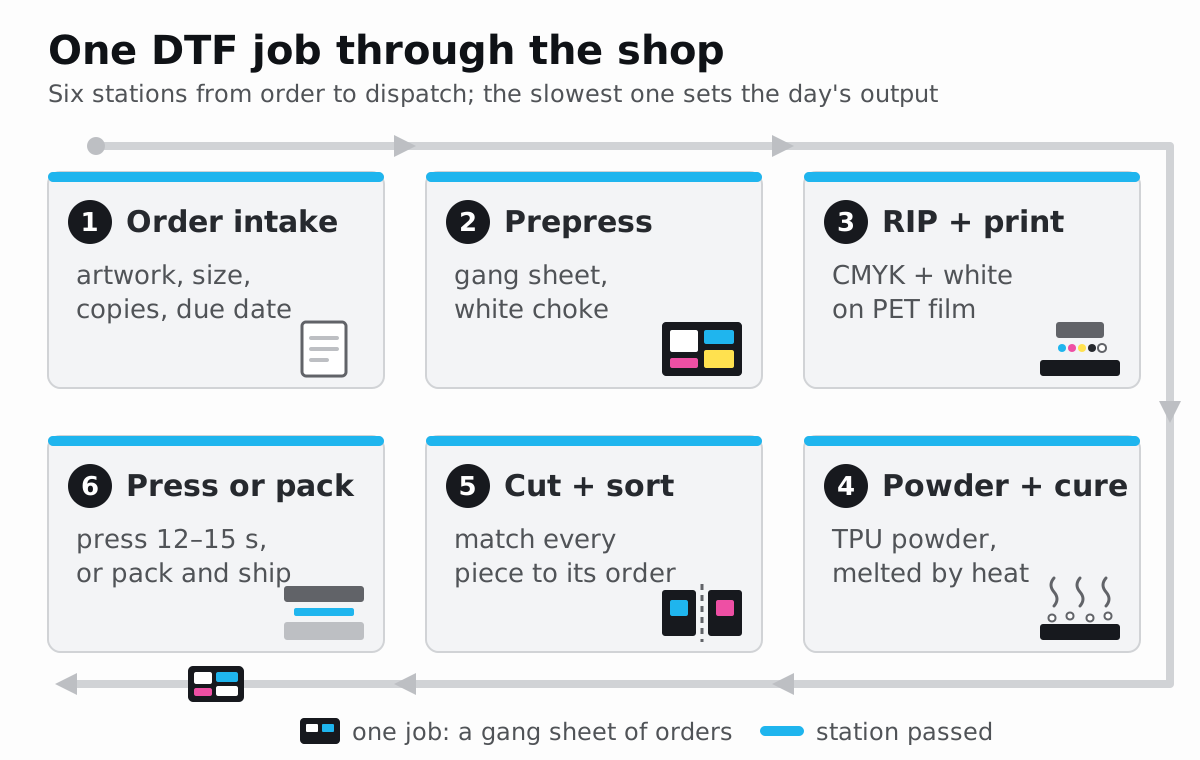
The six stations in the figure at the top each need a written check, because an error is cheapest to fix at the station where it starts:
- Order intake. Record the artwork file, print width and height, copies, garment and due date for every design, then check the file: a transparent PNG with clean edges and enough pixels for its print size. The DTF file requirements list what to ask customers for.
- Prepress. Group compatible orders, pack them onto a gang sheet, set the white underbase (the white layer under the colour) and export the print file.
- RIP and print. Check size, mirroring and white in the RIP queue, print a nozzle check (a test pattern that shows blocked nozzles), then the sheet.
- Powder and cure. Look at the cured film in raking light before cutting: an even, slightly glossy surface with no loose granules.
- Cut and sort. Cut the sheet apart and match every piece to its order before anything is pressed or packed.
- Press or pack. Press with the settings on your film’s sheet, or pack the transfers with those settings for the customer.
NestSheet covers step 2, between approved artwork and the RIP. Upload transparent PNG files, set each design’s print size and copies, choose the roll width (600 mm by default, with a 2 mm gap and 5 mm margin), then let Auto-nest pack the sheet with 0° or 90° rotation or place pieces yourself in Manual. Pick a whole-sheet white choke (how far the white layer is pulled in from the colour edge) of 0, 1 or 2 px and export the Production DTF preset, a mirrored 300 dpi TIFF with CMYK and one W1 white channel, ready for MainTOP, or a transparent PNG if your RIP makes the white. See how approved PNGs become a MainTOP-ready gang sheet.
How many transfers can one printer and one press make a day?
Use three formulas and your own inputs:
film per day (m)  = rated speed (m²/h) ÷ print width (m) × print hours × realisation
transfers per day = film per day (m) × transfers per metre of your layout
presses per hour  = 3,600 ÷ (dwell seconds + handling seconds)
Realisation is the share of rated speed you actually get once the mode you sell in, nozzle checks, roll changes and reprints are counted. Measure it in the first weeks: metres printed divided by the rated metres for the hours the printer ran.
Worked example; every value marked “example” is there to be replaced with yours:
| Input | Value | Source |
|---|---|---|
| Rated speed | 6.0 m²/h | DTF Station, Prestige XL2 at 8 passes |
| Print width | 0.60 m | Same printer |
| Print hours per day | 6 h | Example |
| Realisation | 0.75 | Example; measure your own |
| Transfers per 1,000 mm sheet, 600 mm roll | 6 adult fronts, 11 × 11 in (279.4 mm), or 45 left chests, 4 × 4 in (101.6 mm) | Size chart, 2 mm gap, 5 mm margin |
| Press cycle | 15 s dwell + 45 s handling | Dwell from the press guide; handling is an example |
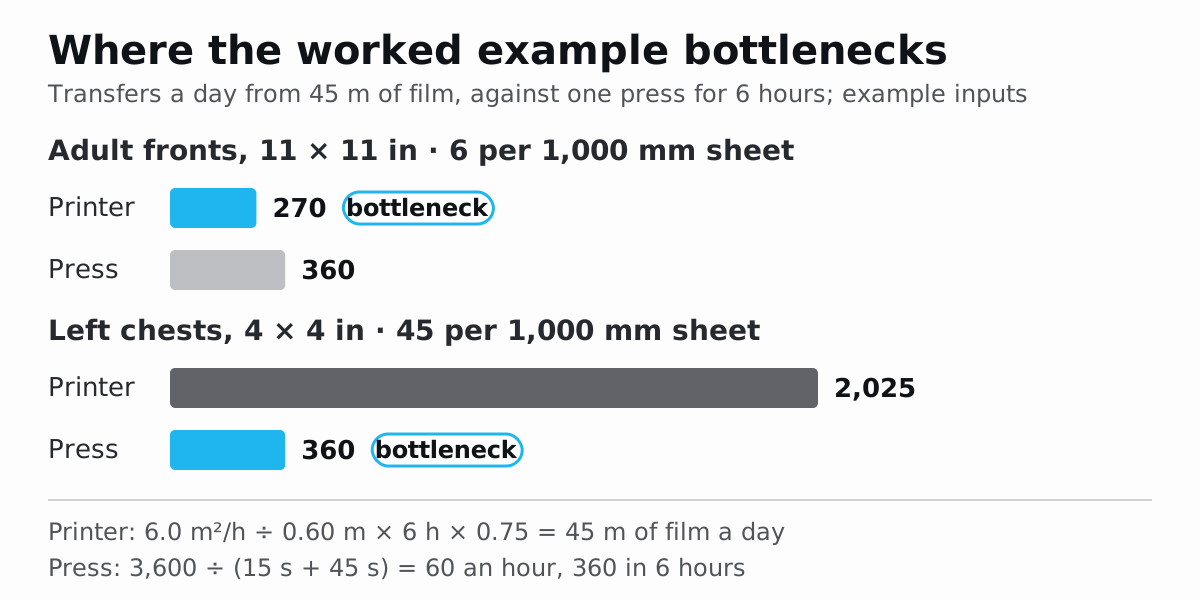
- Film: 6.0 ÷ 0.60 = 10.0 m an hour; 10.0 × 6 × 0.75 = 45 m a day, printed as 45 sheets of 1,000 mm.
- Transfers: 45 × 6 = 270 adult fronts, or 45 × 45 = 2,025 left chests.
- Pressing: 3,600 ÷ (15 + 45) = 60 presses an hour, 360 in six pressing hours.
- Bottleneck: for fronts the printer sets the day (270 against 360); for left chests the press does (360 against 2,025). A second press, or selling the chests unpressed, raises output; a faster printer does not.
Check the curing unit the same way: its rated speed, or the list of printers its maker pairs it with, must cover the printer in the mode you use.
What does it cost to start a DTF business?
No single figure is honest: the total depends on the tier, the region and what you already own. Price each category from quotes and invoices, then feed the monthly share into the break-even formula above.
| Category | What it includes | What drives it | Where your number comes from |
|---|---|---|---|
| Equipment | Printer, shaker-dryer or oven, heat press, compressor for an air press, computer | Film width, new or used, service cover | Dealer quotes; for scale, Mimaki USA lists the TxF150-75 printer alone at a list price (MSRP) of $8,495 |
| Installation | Circuits, extraction duct and fan, make-up air, benches, delivery | The building and local wiring rules | Electrician and ventilation contractor quotes |
| Software | RIP licence if not included, layout and design software | Printer width and edition | Vendor price lists |
| Consumables | Film, ink, powder, cleaning liquid, wipers and caps, test garments | Ink coverage, white density, waste | Invoices ÷ m² printed; Procolored, for one, states 20–25 ml of ink per m² for its DTF-PRO |
| Labour | Prepress, printing, curing, cutting, pressing, packing, daily maintenance | Order mix and batch size | A timed week of real orders |
| Space and energy | Rent share, electricity for the heaters, holding the printer’s specified temperature and RH, heating the make-up air | Climate and running hours | Utility bills; HSE calls heating make-up air “an important running cost” |
| Waste and rework | Tests, failed cures, reprints, blank film on sheets | Layout and process control | A rework log |
| Working capital | Film, ink, powder and blank garments bought before customers pay | Supplier minimums and payment terms | Purchase orders |
List prices exclude tax, delivery, installation and consumables, and they change; ask for a written quote that names every item in the line.
Which mistakes cost new DTF shops the most?
- Buying the printer before checking the building. The heaters, not the printer, set the electrical load, and the curing unit needs a duct route outside.
- Powdering beside the printer. Epson’s F1070 guide forbids it.
- Stirring fumes instead of capturing them. A room fan dilutes; a hood at the curing exit captures.
- Switching the printer off at night. White ink settles, which is why makers tell you to leave it on.
- Planning from the top speed. Plan from the mode you will sell in and a measured realisation.
- Pressing from a generic chart. The film and powder sheet wins; test each new garment.
- Shipping before a wash test. Wash-test each new film, powder and garment combination first.
- Accepting artwork without a print size. Pixels mean nothing until the size is fixed.
- Pricing per piece by feel. Measure film area per order and price from the cost record.
First-month checklist for a new DTF shop
Week 1: room and safety
- Each machine on the circuit its manual asks for, checked by an electrician.
- Curing exhaust ducted outside, make-up air planned, smoke test passed with the line running.
- SDS for the exact ink, powder and cleaning liquid filed where staff can read them; the protective equipment they name on the bench.
- Room log started: temperature and RH at the printer within its specified range.
Week 2: calibration
- Nozzle check complete in every row; the daily white-ink routine written down.
- Press checked with temperature strips and the paper-pull test from the press guide.
- Cure confirmed on film at the powder sheet’s setting.
- One test sheet of your hardest artwork (fine text, solids, soft edges) printed, pressed and kept as a reference.
Week 3: pilot orders
- First paid orders through all six stations, with the check at each one signed off.
- Wash test 24 hours after pressing, inside out, compared with an unwashed piece.
- Every piece matched to its order before packing.
Week 4: numbers
- Measured: metres per print hour, realisation, press cycle time.
- Cost per m² from real invoices; break-even recalculated.
- Rework log reviewed and its largest cause fixed first.
Sources
- Epson, SureColor G6070 Specification Sheet (CPD-65539): https://mediaserver.goepson.com/ImConvServlet/imconv/426ac146b791280e0bdf00636e5d6e14c2fcf0fe/original?assetDescr=SureColor_G6070_Printer_Specification_Sheet_CPD-65539.pdf
- Epson, SureColor F1070 User’s Guide: https://files.support.epson.com/docid/cpd6/cpd64429.pdf
- Procolored, DTF-PRO specification: https://www.procolored.com/pages/specification-dtf-pro
- DTF Station, Prestige XL2 DTF printer (24 in): https://dtfstationglobal.com/product/prestige-xl2-dtf-printer/
- DTF Station, Miro 24 DTF powder shaker with working table: https://dtfstationglobal.com/product/miro24-dtf-powder-shaker/
- Mimaki, TxF150, 300 series Operation Manual: https://mimaki.com/archives/034/202509/D203671-34.pdf
- Mimaki USA, TxF150-75 direct-to-film roll-to-roll printer: https://www.mimakiusa.com/products/TxF150-75
- Vastex, D-100 compact infrared conveyor dryer: https://www.vastex.com/Screen-Printing-Equipment/Infrared-Conveyor-Dryers/D-100/D-100.php
- STAHLS’, Hotronix Fusion IQ operator’s manual: https://assets.stahls.com/stahls/content/pdf/HeatPressManuals/Hotronix-Fusion-IQ-Operators-Manual.pdf
- Epson America, Safety Data Sheet: Ink, T57SA (UltraChrome DF white): https://files.support.epson.com/pdf/msds/t5/t57sa_en_31_hazcom.pdf
- STS Inks, Safety Data Sheet: TPU DTF adhesive powder (TPUP5): https://millcraft.com/wp-content/uploads/2023/05/AL1547-SDS-DTF-TPU-Transfer-Powder.pdf
- Wellington House, Safety Data Sheet: TPU DTF adhesive powder: https://d2zn16t8uygl6t.cloudfront.net/wellingto/images/contentimages/images/DTF_Adhesive_MSDS-1719009423550.pdf
- Covestro, Safety Data Sheet: Desmopan 786E thermoplastic polyurethane: https://solutions.covestro.com/api/uwsi/download?productNumber=00231239&country=AU&language=EN&realSubstanceNumber=112000008171
- HSE, HSG258 Controlling airborne contaminants at work: a guide to local exhaust ventilation: https://www.hse.gov.uk/pubns/priced/hsg258.pdf
- OSHA, Technical Manual, Section III Chapter 3: Ventilation Investigation: https://www.osha.gov/otm/section-3-health-hazards/chapter-3