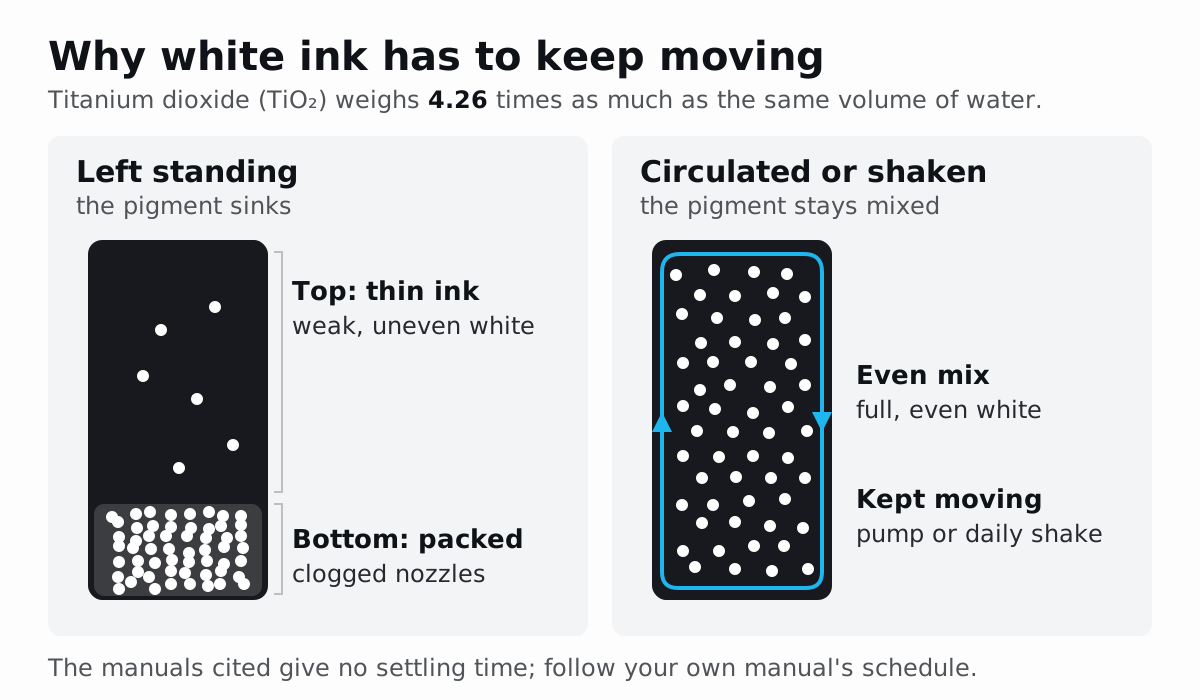
Shake or circulate white ink every working day, print a nozzle check before each run, and clean the wiper and caps on your manual’s schedule, which overrides any generic list. Hold the room at 20–25 °C (68–77 °F) and 40–60 % RH. Idle with white ink loaded, Epson’s G6070 needs switching on at least every seven days, or storage maintenance for breaks of two weeks or more.
| Task | Epson SureColor G6070 (DTF) | Mimaki TxF150-75 / TxF300-75 (DTF) | Brother GTXpro (DTG, white ink) |
|---|---|---|---|
| Shake white ink | Every day before work; the printer prompts every 24 hours | 40 times after 24 hours powered on; 100 times after more than three days | About 100 times once a day, roughly 50 seconds |
| Wiper and caps | Clean around the suction cap when prompted | Clean daily, after work | Clean when prompted |
| Nozzle check | ”Each time you print” | Test print, then the cleaning level the pattern calls for | Recommended every time; print the white check on dark or clear media |
| Idle, no storage routine | Switch on at least every seven days | After more than two days, clean cap edges, wiper and carriage underside before use | Never switch off; over two weeks, run a maintenance round every two weeks |
| Long break | Storage maintenance from two weeks, with five cleaning ink units | Storage wash before a week or more | The two-weekly round continues |
| Room | 20–25 °C (68–77 °F), 40–60 % RH | 20–30 °C (68–86 °F), 35–65 % RH | 18–30 °C (64.4–86 °F), 35–85 % RH |
Values come from each maker’s manual (see Sources). The Brother is a direct-to-garment printer, included because it runs the same kind of white ink. RH is relative humidity.
Why does white DTF ink settle and clog?
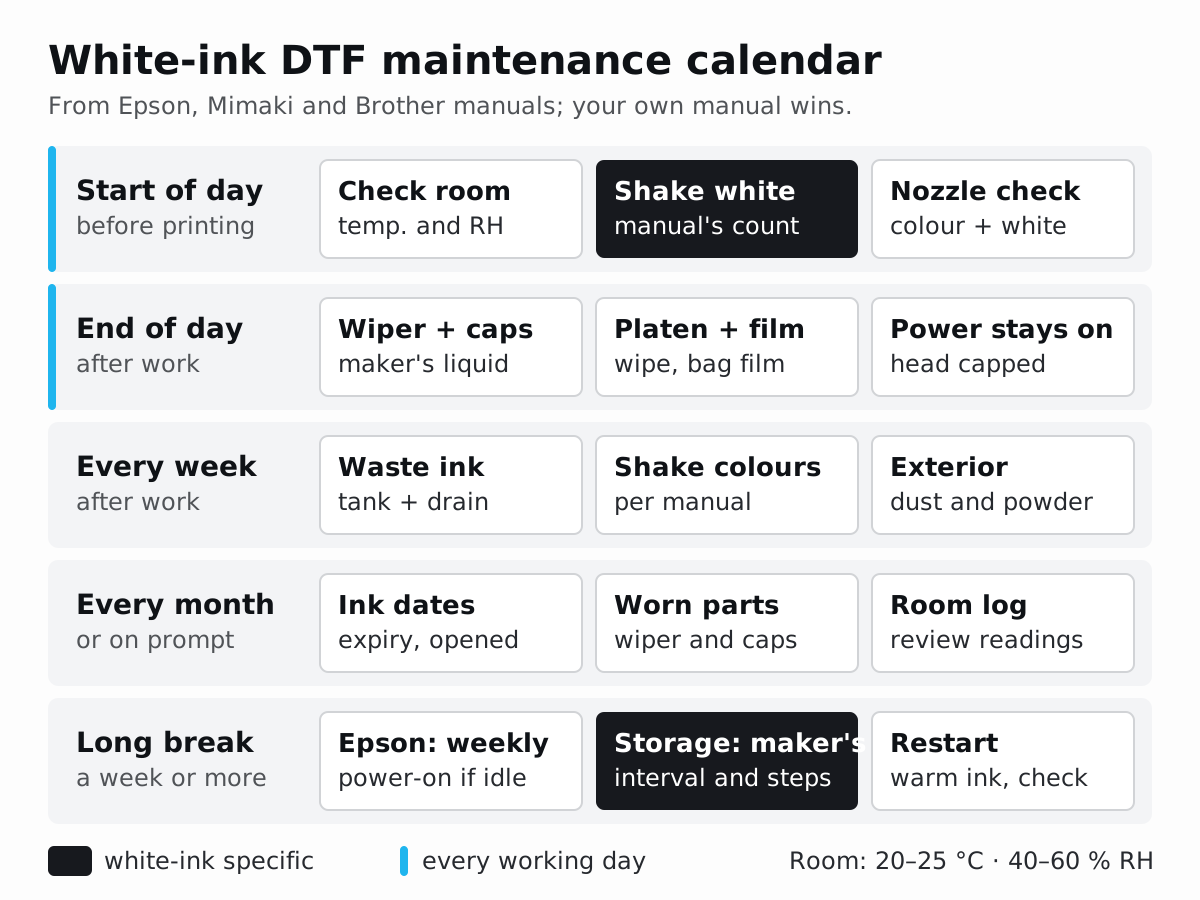
White ink prints the white underbase, the layer behind the colour in every DTF transfer. Its colour comes from titanium dioxide (TiO₂), an insoluble white pigment carried as solid particles in a thin, mostly water-based liquid. Epson’s safety data sheet for its UltraChrome DF white (T57SA, used in the SureColor G6070) lists 50–65 % water, 7–10 % titanium dioxide and a viscosity below 5 mPa·s at 20 °C (68 °F).
Three facts explain why the pigment sinks:
- Density. NIOSH gives titanium dioxide a specific gravity of 4.26, so a particle weighs 4.26 times as much as the same volume of water.
- Size. Chemours, a titanium dioxide maker, puts the best light-scattering size between 0.2 and 0.3 µm. Particles in that range make white opaque; much smaller ones scatter less light, so the pigment cannot simply be ground finer to stop it sinking.
- Viscosity. In Stokes’ law for small particles, settling speed rises with the density difference and with the square of the particle diameter, and falls as the liquid gets thicker. A thin ink resists very little.
A paper on UV-curable white inkjet ink from Hexion, presented at RadTech, calls settling “unavoidable” because of that density gap; formulation only changes its speed. None of the manuals and data sheets cited here gives a settling time for DTF white, so follow your manual’s interval rather than an hour count from a forum.
Settled ink causes two different faults. Pigment collects low in the pack and the ink tubes, so the ink reaching the head swings between pigment-poor and pigment-rich: thin ink prints a weak, uneven white, and packed pigment blocks nozzles. Epson’s G6070 guide puts it in one line: “If ink settles, tint unevenness and nozzle clogs occur.” Mimaki’s TxF manual adds that “white nozzles tend to clog easily when maintenance operations are not performed properly”.
Circulation pumps white ink round the ink path while the printer is powered. Brother’s GTXpro circulates in standby “to prevent sedimentation of the white ink”, Mimaki’s TxF specifications list an “ink sediment cycle” for white, and Epson’s F1070 has a built-in white circulation system. None of it runs with the power off. Shaking re-mixes the ink in the pack, and every maker above still asks for it daily, so circulation does not replace it.
Shake gently and count. Epson warns that forceful shaking can make packs leak, and the Hexion paper notes that a gentle swirl without air bubbles extends the ink’s settling life. Epson also wants packs stored flat: stored upright, the sediment may not clear “even by shaking them”.
What should a DTF operator do every day?
At the start of the working day
- Read the room. Check temperature and humidity on the printer’s display (the G6070 and GTXpro both show them) or on a thermo-hygrometer beside it, and correct the room before printing if either is out of range. Brother warns that outside its range “the print heads may be clogged with ink”.
- Shake the white ink exactly as your manual describes. The counts differ widely: Epson’s G6070 asks for 5 shakes in 5 seconds at about 60°, its F1070 about 10, Mimaki 40 and Brother about 100 in roughly 50 seconds.
- Check the waste ink and the cleaning liquid. Brother says to empty the waste ink tank once it is half full and top up the cleaning solution; Mimaki’s automatic maintenance stops when its waste tank is 90 % full.
- Print a nozzle check for the colour and white channels. White lines are hard to see on clear film over a light bench; Brother’s manual puts the white check on black paper, dark fabric or a transparent sheet.
- Clean only if the pattern calls for it, then check again. Epson notes that head cleaning consumes ink from all colours.
- Load clean, acclimatised film. Mimaki asks for media to rest in the print room for at least 30 minutes after unpacking, and warns that dust at roll ends can clog nozzles.
You are ready when the room reads within range and the nozzle check is complete in every row.
At the end of the working day
- Clean the wiper and caps if your schedule says so: daily on Mimaki’s TxF printers, when prompted on Epson and Brother.
- Wipe the platen. Epson recommends cleaning the G6070’s platen daily because ink stuck to it marks the film.
- Take the film off. Epson asks for media to be rewound into its packaging; Mimaki warns that film left on the roll holder after hours collects dust.
- Keep powder out of the printer. Epson warns that powder inside can cause head clogging, and that powdered film must never be rewound into the printer.
- Leave the printer switched on and closed. All three makers’ printers run automatic maintenance while powered. Epson adds that each power-on starts an ink-consuming maintenance cycle, and that cutting power at a switch or breaker can leave the head uncapped.
You are done when the head is parked on its caps, the covers are closed and the film is bagged.
Which tasks are weekly, monthly or on demand?
Mimaki’s care guide for the TxF150-75 and TxF300-75 gives the clearest weekly list for a DTF printer: after work, clean the platen and exterior, check the waste ink tank and clean the waste ink draining channel, where ink otherwise coagulates and blocks it; before work, shake the colour inks.
Monthly work is mostly triggered by the printer. Epson replaces the wiper unit, capping station and flushing pad together as a head cleaning set when the G6070 asks, and Mimaki says to replace a wiper early if it is deformed or no longer wipes clean. A fixed monthly round is still good shop practice: check ink expiry and installation dates, review the temperature and humidity readings, and clear dust and powder from around the printer.
Times come from the manuals where one is given; the rest are approximate.
| Task | Frequency | Time | Tools | Symptom if skipped |
|---|---|---|---|---|
| Shake white ink | Daily before work (Epson, Brother); every 24 hours powered on (Mimaki) | 5 seconds (Epson G6070) to about 50 seconds (Brother) per pack | Gloves; a paper towel to hold the cartridge (Mimaki) | Uneven, weak white; nozzle clogs |
| Nozzle check | Before each run, after any idle period and after maintenance | About 3–5 minutes (approx.) | Film, a black surface, a magnifier | Gaps and banding found on a finished sheet instead of a test |
| Wiper, caps and carriage underside | Daily after work (Mimaki); when prompted (Epson, Brother) | Under 10 minutes (Epson’s F1070 limit) | Lint-free cleaning sticks, the maker’s cleaning liquid, gloves | Clogged or deflected nozzles; dried ink rubbed onto the film (Mimaki) |
| Platen | Daily (Epson); weekly (Mimaki) | About 5 minutes (approx.) | Soft cloth; mild detergent if soiled | Ink marks on the film |
| Waste ink and cleaning liquid | Check daily (Brother: empty at half full) | About 3 minutes (approx.) | Gloves, sealed waste container | Automatic maintenance stops when the tank is too full |
| Waste ink drain channel | About once a week (Mimaki) | Set by the printer | Maintenance menu | Coagulated ink blocks the drain |
| Shake colour inks | Weekly (Mimaki); every three weeks (Epson G6070); monthly (Epson F1070) | Under 20 seconds per pack (approx.) | Gloves | Tint unevenness |
| Wiper, caps, flushing pad, filters | When the printer prompts, or when worn | Within 10 minutes on Epson printers, before the head dries | The maker’s replacement parts | Head cleaning fails; worn caps let nozzles dry |
| Ink dates | Monthly (shop practice) | About 5 minutes (approx.) | Stock list | Expired ink can cause ejection failures or colour shifts (Mimaki) |
How do you clean the capping station and wiper?
Four parts at the maintenance station keep the head healthy:
- Capping station: caps that close over the nozzles while the printer is idle, “to prevent them from drying” in Epson’s words.
- Wiper: a blade that wipes ink off the nozzle surface.
- Suction cap: on Epson’s G6070, the cap that pulls ink through the nozzles during head cleaning.
- Flushing pad: the pad the head fires ink into during flushing.
Dried ink on these parts works against the head. Mimaki’s care guide says a dirty wiper can rub against the nozzle surface or cause “ink suction problems that lead to ejection failure (such as nozzle clogging or deflection)”, and that dried ink on the cap rubber “may cause cleaning failure”. Epson says that if you keep printing after the G6070 asks for suction cap cleaning, “it will become harder to clear the nozzles”.
- Move the head with the maintenance menu, never by hand.
- Wear gloves, eye protection and a mask, as both Epson and Mimaki require.
- Use the maker’s tools and liquid only: lint-free cleaning sticks with the ink cleaner (Epson G6070), maintenance liquid (Mimaki) or distilled water where the guide specifies it (Epson F1070). Mimaki rules out cotton swabs, whose fibres can stick to the nozzle surface; Epson’s F1070 guide rules out tap water, and alcohol on the suction cap and capping station. Take a fresh stick each time.
- Wipe the cap rims and cap case, both faces of the wiper, the wiper cleaner and the edges of the carriage underside. Never touch the nozzle surface.
- Leave nothing behind. Mimaki asks for the cleaning liquid to be wiped off so none remains, and warns that fragments of cleaning stick raise the risk of clogging and deflection.
- Finish within 10 minutes. The head is uncapped while you work; Epson’s F1070 guide sets a 10-minute limit to stop it drying, and the G6070 sounds a buzzer at 10 minutes.
- Return the head and print a nozzle check. The job is finished when the check is complete in every row.
Replace consumables when the printer asks rather than stretching them, and dispose of used cleaning liquid as the manual says; Epson classes it as industrial waste.
How do you read a nozzle check?
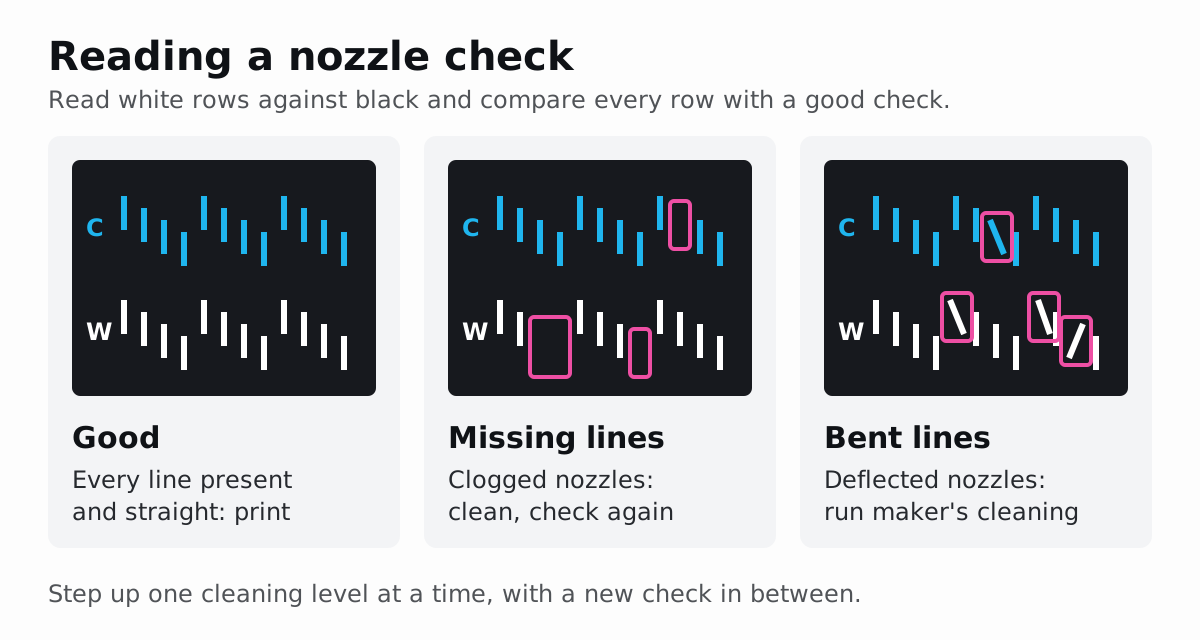
A nozzle check fires every nozzle of every channel into a fixed grid of short lines, so a missing or misplaced line points at a specific nozzle. Read the colour rows on a light background, the white rows against black, and use a magnifier for fine gaps. On a finished sheet, missing nozzles show up as fine lines or bands across the print; Epson lists banding as a reason to run the check.
| What you see | What it means | First action | How to confirm |
|---|---|---|---|
| Every line present, straight and evenly spaced | All nozzles firing | Keep the sheet as your reference | |
| Lines missing in one row | Clogged nozzles that eject no ink | Lowest cleaning first: Auto, then Light, Medium and Heavy on Epson’s G6070; Normal, then Hard on Mimaki | Check again after each level |
| Bent, slanted or doubled lines | Ink deflected by residue on the nozzle surface; in white rows, Epson’s “not being fired properly” | Mimaki: Soft cleaning (a head wipe) and a wiper and cap clean; Epson: Cleaning (Light), then the Nozzle Refresh tool | Check again |
| A whole white row faint or patchy | Settled or thin white ink | Shake or circulate the white, then Cleaning (Heavy) on the white rows (Epson) | Check again; Epson says call support if one or two heavy cleanings do not help |
| Gaps that survive the strongest cleaning | Dried ink in the head, or a fault | Mimaki: ink fill, then nozzle washes of 1 minute and 10 minutes; otherwise your dealer | Service visit |
Do not clean blind: every cleaning burns ink, and Epson warns that using the Nozzle Refresh tool too often “may cause the print quality to decline”. Step up one level at a time, with a check in between.
Learn what normal looks like on your machine. Brother notes that faint lines in its white check do not matter, because several nozzles fire white onto the same spot; a broken, intermittent line is the fault. Keep a good pattern from each printer for comparison.
If transfers from a sheet with weak white also fail in the wash, rule out the press and curing as well: the guide to DTF peeling, cracking and fading after washing works through those causes.
How long can a DTF printer sit idle with white ink?
Not long without a plan; the makers’ limits run from two days to two weeks. Mimaki changes the start-up routine after two days and expects its storage wash before any break of a week or more; Epson wants a power-on at least every seven days and storage maintenance from two weeks; Brother keeps its printer on and repeats a maintenance round every two weeks.
| Printer | Idle a few days | Idle up to two weeks | Two weeks or more |
|---|---|---|---|
| Epson SureColor G6070 | Leave on; shake white when prompted | Switch on at least every seven days and let maintenance cleaning finish | Keeping Preparation with five cleaning ink units and a new waste ink bottle, then switch off |
| Epson SureColor F1070, white ink mode | Leave on | Switch on at least every seven days | Two weeks to one month: one cleaning ink pack and a switch to the colour-only ink mode; one month or more: five cleaning ink packs |
| Mimaki TxF150-75 / TxF300-75 | Over two days: clean cap edges, wiper and carriage underside before use; over three days: shake white 100 times | A week or more: run the storage wash and replace the waste ink tank | As for a week or more |
| Brother GTXpro | Keep it powered | On return: waste ink, cleaning liquid, white stir, nozzle check | Repeat that round every two weeks, with white circulation when prompted |
Switched-off time is the risk. A powered printer keeps working on itself: Mimaki runs auto maintenance “periodically” while the main power is on, and Brother circulates white in standby. A switched-off printer has only its caps. Epson is blunt about skipping the storage routine: “a print head nozzle could become permanently clogged.”
What should you do before a holiday shutdown?
- Choose the route. Either someone keeps the printer powered and runs the routine at your maker’s interval (Epson: a power-on at least every seven days; Brother: a maintenance round every two weeks), or the printer goes through its storage procedure.
- Order the consumables first. Epson’s G6070 storage procedure needs five cleaning ink units and a new waste ink bottle, and may not complete if ink or cleaning liquid runs low. Mimaki asks you to check that enough ink remains once the storage work is done.
- Clean on the last day: wiper, caps, carriage underside and platen. Replace the waste ink tank if the break is longer than a week (Mimaki).
- Run the storage procedure from the maintenance menu and follow the screen: Keeping Preparation on Epson, the storage cleaning wash on Mimaki.
- Store removed packs properly. Epson asks for ink on each supply port to be absorbed with a fresh cleaning stick per colour, and for packs to be stored flat at room temperature.
- Close up. Take the film off, seal the powder and close all covers; Epson suggests an anti-static cloth or cover against dust.
After the break:
- Warm the ink first. Packs kept somewhere cold need four hours at room temperature (Epson) or at least three hours (Mimaki).
- Follow the screen to reinstall ink and fit a new waste container, then print a nozzle check and clean only where it shows faults.
- Expect weak white at first. Epson notes that white density may be low after restarting in white ink mode, so print a test on film before production; a controlled DTF test file makes the before-and-after comparison repeatable.
The printer is back in service when the nozzle check is complete and a test transfer matches your reference.
What temperature and humidity does a DTF printer need?
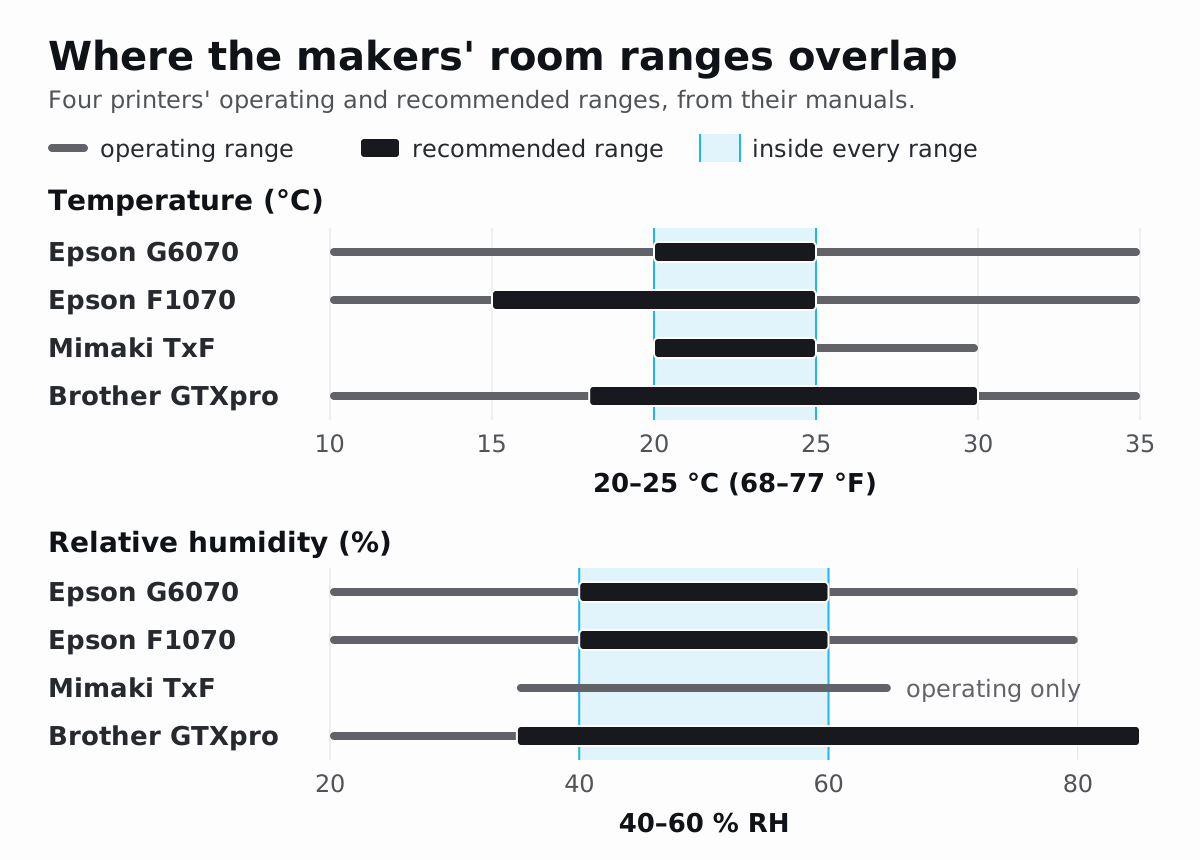
Aim for 20–25 °C (68–77 °F) and 40–60 % relative humidity, held steady. That band sits inside the recommended ranges of all four printers below, and inside Mimaki’s only stated humidity range. Their wider operating limits are where the printer will run, not where its maker promises print quality.
| Printer | Operating temperature | Recommended temperature | Operating humidity | Recommended humidity |
|---|---|---|---|---|
| Epson SureColor G6070 (DTF) | 10–35 °C (50–95 °F) | 20–25 °C (68–77 °F) | 20–80 % | 40–60 % |
| Epson SureColor F1070 (DTG/DTF) | 10–35 °C (50–95 °F) | 15–25 °C (59–77 °F) | 20–80 % | 40–60 % |
| Mimaki TxF150-75 / TxF300-75 (DTF) | 20–30 °C (68–86 °F) | 20–25 °C (68–77 °F), where accuracy is guaranteed | 35–65 % | No narrower figure given |
| Brother GTXpro (DTG) | 10–35 °C (50–95 °F) | 18–30 °C (64.4–86 °F) | 20–85 % | 35–85 % |
Humidity figures are non-condensing. Epson’s G6070 specification sheet gives 15–35 °C operating and 15–25 °C recommended; the table follows the user’s guide. The shared band takes the highest lower limit and the lowest upper limit, with Mimaki’s operating humidity standing in for a recommended figure: 20 °C (G6070, Mimaki) to 25 °C (both Epsons, Mimaki), and 40 to 60 % (both Epsons).
Dry air and draughts dry the nozzles. Epson asks for humidity to be kept up “in dry areas, air conditioned environments, or under direct sunlight”, and for the printer to stay away from heaters and from draughts off ventilators or air conditioners. Brother’s support advice for its GTX printers is a humidifier under the printer, filled with distilled water only, because minerals in tap water can be deposited in the nozzles, and never a misting type.
Heat and swings cost ink and accuracy. Epson’s F1070 warns once the air around it passes about 30 °C (86 °F), after which automatic cleanings may run more often. Mimaki asks for a head cleaning if the machine has stood outside 20–30 °C, and specifies a temperature change of no more than 10 °C per hour.
Damp hits the consumables. Epson points out that a room can suit the printer and still be wrong for the film, and the film and powder documents below set their own humidity ceilings. As shop practice, measure beside the printer at head height, away from doors and heaters, and log the reading each morning so a bad white day has a recorded cause. Planning a new print room? The DTF start-up guide covers space, power and ventilation.
How should you store DTF ink, film and powder?
Keep all three sealed, dark, dry and at room temperature, and date everything when you open it. The makers’ own numbers:
| Item and document | Temperature | Humidity | Usable life | Before use |
|---|---|---|---|---|
| Epson UltraChrome DF ink packs (G6070 user’s guide) | Room temperature, out of direct sunlight; storage limits −20 to 40 °C (−4 to 104 °F), no more than four days at −20 °C or a month at 40 °C | Not stated | The earlier of the printed expiry date or one year after installing | Store packs flat; give packs kept cold four hours to warm up |
| Mimaki TxF ink (operation manual) | A cool, dark place | Not stated | Use within one month of opening the cartridge | At least three hours at room temperature if brought in from the cold |
| Brother GTXpro ink pouches (instruction manual) | 0–40 °C (32–104 °F), out of direct sunlight | Not stated | Within six months of opening the sealed package | Shake new white pouches in their box |
| DTF Station PET transfer film (safety data sheet) | 22 ± 5 °C (62.6–80.6 °F); avoid over 30 °C (86 °F) for long-term storage | Below 50 % RH | 24 months under those conditions | Let it rest in the print room at least 30 minutes after unpacking (Mimaki) |
| STS Inks TPU adhesive powder (safety data sheet) | 20–30 °C (68–86 °F), in the dark | 45–55 % RH | Keep in the original packaging; use unpackaged excess within a day | Keep it away from the printer |
Ink. Write the opening or installation date on every pack; Brother even ships a shelf-life label for each cartridge. Mimaki warns that expired ink may cause ejection failures or shift the colour tone. Keep stock away from vans, windows and heaters, and use the oldest first.
Film. DTF Station gives moisture absorption and mould as the reasons for its humidity limit on PET (polyethylene terephthalate) film, and softening and sticking as the reasons for its heat limit. Mimaki adds that some coatings change if left exposed to air, so keep rolls bagged, boxed and off the floor.
Powder. STS asks for dark storage in the original packaging, no prolonged contact with air and no wetting. As shop practice, close the shaker’s powder hopper at the end of the day.
Check the nozzles before a long gang sheet
A long gang sheet is where a skipped check costs most: a nozzle that stops firing leaves its gap on every pass, so the fault repeats down the whole film and can mark every design it crosses. Epson’s F1070 guide says to check for clogged nozzles “before large print jobs”. The G6070 can also check its nozzles while printing, by default every 0.5 m (1.64 ft) of media, and alert once clogged nozzles pass a set count: 9 for white and 4 for colour by default.
NestSheet’s Production DTF preset exports the whole gang sheet as one 300 dpi TIFF, mirrored by default, with CMYK plus a W1 white channel for MainTOP, so the white underbase for every design on the sheet prints in the same run. Print the nozzle check, read it, then send the Production DTF export to the queue. For a very long order, plan sheets your RIP opens reliably; the guide to long gang sheets and RIP memory shows how to size them.
Sources
- Epson, SureColor G6000 Series (G6070) User’s Guide: https://files.support.epson.com/docid/cpd6/cpd65906.pdf
- Epson, SureColor G6070 Specification Sheet (CPD-65539): https://mediaserver.goepson.com/ImConvServlet/imconv/426ac146b791280e0bdf00636e5d6e14c2fcf0fe/original?assetDescr=SureColor_G6070_Printer_Specification_Sheet_CPD-65539.pdf
- Epson, SureColor F1070 User’s Guide: https://files.support.epson.com/docid/cpd6/cpd64429.pdf
- Epson America, Safety Data Sheet: Ink, T57SA (UltraChrome DF white): https://files.support.epson.com/pdf/msds/t5/t57sa_en_31_hazcom.pdf
- Mimaki, TxF150, 300 series Operation Manual: https://mimaki.com/archives/034/202509/D203671-34.pdf
- Mimaki, TxF150-75 / TxF300-75 Requests for Care and Maintenance: https://mimaki.com/archives/034/202507/D203679-33_TxF150,300series_Requests%20for%20Care%20and%20Maintenance-e.pdf
- Brother, GTXpro Instruction Manual: https://brotherdtg.com/downloads/gtxpro/GTXpro_manual_EN_ver5.pdf
- Brother USA Support, GTX: humidifier and distilled water: https://help.brother-usa.com/app/answers/detail/a_id/160822/~/gtx-pre-shipment-overview:-humidifier-and-distilled-water
- NIOSH, Pocket Guide to Chemical Hazards: Titanium dioxide: https://www.cdc.gov/niosh/npg/npgd0617.html
- Chemours, Ti-Pure titanium dioxide for coatings: https://www.tipure.com/en/-/media/files/tipure/legacy/titanium-dioxide-for-coatings.pdf
- S. Madhusoodhanan and D. S. Nagvekar (Hexion), UV curable high opacity ink jettable white ink, RadTech 2006: https://www.radtech.org/proceedings/2006/papers/094.pdf
- J. Southard, Settling of spheres (Introduction to Fluid Motions and Sediment Transport, LibreTexts): https://geo.libretexts.org/Bookshelves/Sedimentology/Introduction_to_Fluid_Motions_and_Sediment_Transport_%28Southard%29/03%3A_Flow_Past_a_Sphere_II_-_Stokes%27_Law_The_Bernoulli_Equation_Turbulence_Boundary_Layers_Flow_Separation/3.09%3A_Settling_of_Spheres
- DTF Station Global, Safety Data Sheet: DTF Printing Film (PET): https://www.yesltd.co.uk/wp-content/uploads/2026/02/dtf-station-sds-dtf-special-film-2025.pdf
- STS Inks, Safety Data Sheet: TPU DTF adhesive powder (TPUP5): https://millcraft.com/wp-content/uploads/2023/05/AL1547-SDS-DTF-TPU-Transfer-Powder.pdf