Choose DTF gang sheet software by who builds the sheet and where white is made. Free browser makers (Free Gang Sheet Maker, SheetBuilder, DTFBuild) pack transparent PNGs into a PNG or PDF for the RIP; RIPs such as Fiery Digital Factory and Flexi DTF Pro nest jobs and make white in the queue; prepress tools such as DTF Transfer Studio and NestSheet can write a white channel into the file.
Every fact below comes from the vendor’s own pages, checked 9 October 2026, and each tool name links to its source. “Not stated” means the page is silent, not that the tool lacks the feature. Prices change, so open the link before you buy.
| Tool | Type | Where it runs | Published price model |
|---|---|---|---|
| Fiery Digital Factory DTF Edition (formerly CADlink) | RIP with a built-in Gang Sheet Builder | Windows 11 (64-bit) desktop | Licence from $445 (Desktop Edition) or $945 (Production Edition) in Fiery’s shop, or from a dealer; free evaluation download |
| Flexi DTF Pro (SAi) | Design and RIP software with gang sheet presets | Windows 10 or later | Subscription: $99.99 per month or $899.99 per year in SAi’s store; “pricing varies by region”; a seven-day evaluation turns into a subscription unless cancelled |
| AcroRIP V11 | RIP | Windows 7 to 11, with a USB security dongle | Sold by authorised resellers; no price on acrorip.com |
| MainTOP RIP | RIP, with an auto-layout edition listed | Installed software from the maker’s download centre | Not published on its English pages |
| DTF Gang Sheet Builder (dtfgangsheetbuilder.com) | Browser layout tool | Browser; files stay on your computer | First 3 exports free; Pro 19 USD per month or 190 USD per year |
| Free Gang Sheet Maker | Free browser tool, plus a paid embed for shop websites | Browser; artwork is not uploaded | Free with no account; the embed starts at $49 per month |
| DTFBuild | Browser builder with a Mac and Windows app and store tools | Browser or desktop app; the layout is calculated on its server | Free plan with 50 completed exports per month; paid Starter and Pro plans |
| SheetBuilder | Free, open-source browser tool | Browser; no uploads | Free for personal and non-commercial use; $29 one-time commercial licence |
| Build a Gang Sheet (Drip Apps) | Storefront builder used by your customers | Shopify app or WordPress plugin, inside your store | Free to install; 5% of every gang sheet fulfilled, at most $12 per order |
| DTF Transfer Studio | Desktop prepress app | Windows 10 or later (64-bit) or macOS 11 or later; works offline | $19 per month or $199 per year; seven-day free evaluation |
| NestSheet | Browser-based DTF prepress | Browser | Free during early access; paid plans later |
What types of DTF gang sheet software are there?
A gang sheet is one print on DTF film carrying many designs, packed across the roll width to waste less film. Gang sheet software comes in five types, and the type settles two questions before any feature does: who places the designs, and which program makes the white ink printed under the colours.
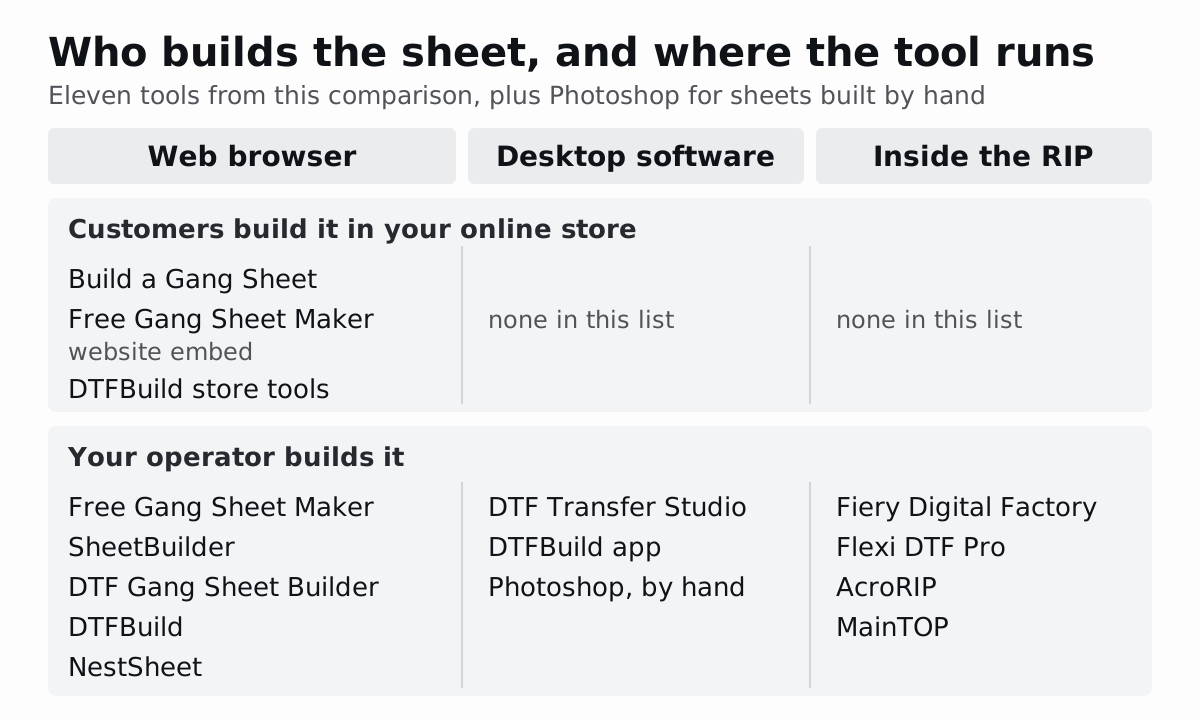
| Type | Who builds the sheet | Where it runs | What leaves the tool | Examples here |
|---|---|---|---|---|
| Free browser maker | The operator, or a customer at home | Web browser | A transparent PNG; some add PDF | Free Gang Sheet Maker, SheetBuilder, DTF Gang Sheet Builder, DTFBuild |
| Storefront builder | The customer, while ordering | The shop’s website | PNG, PDF or TIFF for the shop’s RIP | Build a Gang Sheet, the Free Gang Sheet Maker embed, DTFBuild’s store tools |
| Operator prepress | Prepress staff | Browser or desktop | A production file that can carry a white channel | NestSheet, DTF Transfer Studio |
| RIP with nesting | The RIP operator | The computer that drives the printer | Printer data; the RIP prints the job | Fiery Digital Factory, Flexi DTF Pro, AcroRIP, MainTOP |
| Desktop design software | A designer, by hand | Desktop | PSD or TIFF, with spot channels if the designer adds them | Photoshop |
A RIP (raster image processor) is the program that turns a finished file into printer instructions: colour conversion, ink limits, the white ink layer and the print queue. A DTF printer is normally driven through one, so the real choice is whether layout also happens in the RIP or in a separate tool before it. The map of builders, nesting software and RIPs explains each handoff in detail; this article compares named products.
DTFBuild and Free Gang Sheet Maker span two types: each has a free browser tool and a version for shop websites, and DTFBuild adds a Mac and Windows app.
How do the tools compare on files, nesting and white ink?
The second table covers input files, automatic layout, white ink and output. Quoted words are the vendor’s own.
| Tool | Input files | Automatic layout | White ink | Output |
|---|---|---|---|---|
| Fiery Digital Factory | Image files added singly or by folder; formats not listed on the pages checked | Gang Sheet Builder with “Block Nest or Manual” layout, 90° rotation steps, spacing between jobs and between copies, auto-crop | Made in the RIP queue: “Set white choke”, maximum white ink and white-under-black settings | Printed from the RIP queue |
| Flexi DTF Pro | Imports artwork; formats not listed on the product page | ”gang sheet presets and automatic nesting” | Made in the RIP: “Fine-tune density, choke, and bleed directly in the RIP” | Printed, and cut, from the RIP |
| AcroRIP V11 | Not stated on its pages | Not stated; lists “Multi-Image Handling” for V11 | One-pass white and colour printing for dark garments | Printed from the RIP |
| MainTOP RIP | Not stated on its English pages | Auto-layout edition listed | Not stated on its English pages | Printed from the RIP |
| DTF Gang Sheet Builder | Transparent PNG | ”Rectangle auto-pack with optional 90° rotation” | Not stated; exports a transparent PNG “ready for RIP software” | 300 DPI transparent PNG; Pro adds PDF with cut guides |
| Free Gang Sheet Maker | Transparent PNG | ”Smart nesting” into transparent gaps, or a plain grid; optional rotation; trim | Not stated | 300 DPI PNG; long layouts split into pages in a ZIP |
| DTFBuild | PNG, JPG, WebP; the desktop app also takes PDF | Automatic packing with 90° rotation; gap 0–20 mm | Not stated | Transparent PNG at 72, 150 or 300 DPI, or PDF |
| SheetBuilder | JPG, PNG, GIF, WEBP | Rectangle packing that tries each image upright and rotated | Not stated | PDF, or PNG at 72 to 1200 DPI |
| Build a Gang Sheet | PNG, JPEG, PSD, PDF | ”Auto Build” arranges a customer’s uploads into one or more sheets | Not stated on the listing | One PNG or PDF; its standalone settings add TIFF |
| DTF Transfer Studio | Graphic files, PDF included | Automatic arrangement with a set margin; extra sheets added when needed | A spot channel, such as “White”, with an offset that shrinks or grows the mask | PNG, TIFF (spot channels “experimentally”), JPG, or PDF with vector spot channels and cut paths |
| NestSheet | Transparent PNG, up to 100 MB per file | Auto-nest at 0° or 90° on rectangular artwork bounds, or Manual placement | One W1 white channel made from the artwork’s transparency, with a whole-sheet choke of 0, 1 or 2 px; a PNG export leaves white to the RIP | TIFF with CMYK + W1 (five channels), 300 dpi, for MainTOP, or a transparent 300 dpi PNG; mirroring is a switch |
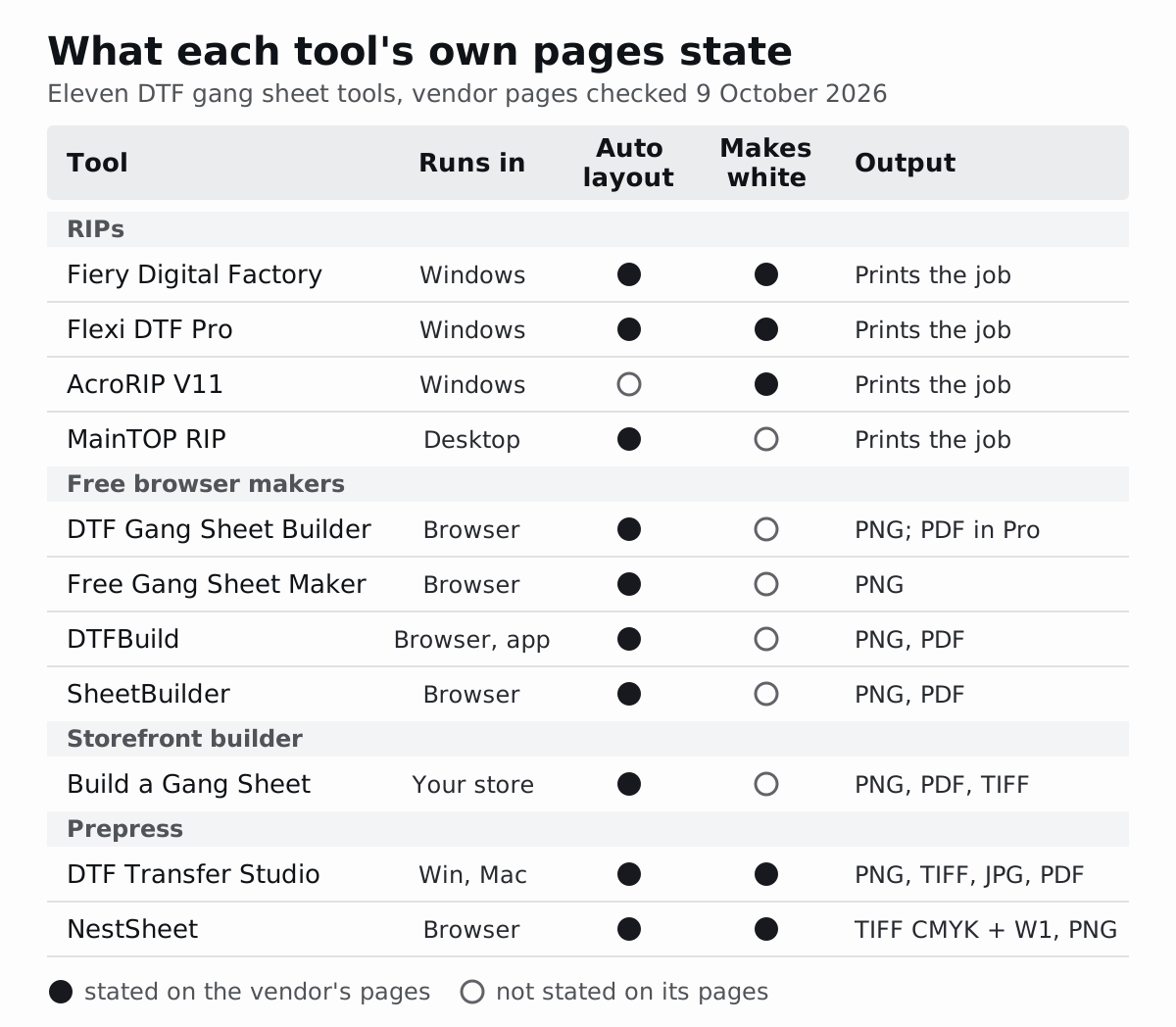
Three patterns stand out. First, automatic layout is common rather than special: ten of the eleven tools state it, and AcroRIP’s pages describe multi-image handling without using the word nesting. Second, white ink splits the field. Three RIPs say they make or print white (MainTOP’s English pages are silent), two prepress tools write white into the file, and none of the four free makers mentions white at all. Third, the output decides your next step. A RIP prints the job itself, while every other tool hands a file to a RIP.
Most builders export at 300 DPI, the usual DTF target at print size. SheetBuilder’s 1200 DPI PNG holds (1200 ÷ 300)² = 16 times the pixels of the same sheet at 300 DPI, a much heavier file for the RIP; the DTF resolution guide explains when other figures make sense.
Where is the white layer made: prepress or RIP?
DTF prints the colours onto film and a layer of white ink behind them, so the design stays bright on a dark garment. That white layer, the underbase, should sit slightly inside the colour edge, or a thin white rim can show around the design. Shrinking it is called choke. Some program in your chain has to create the underbase and decide its choke, and gang sheet tools differ most on whether they do it.
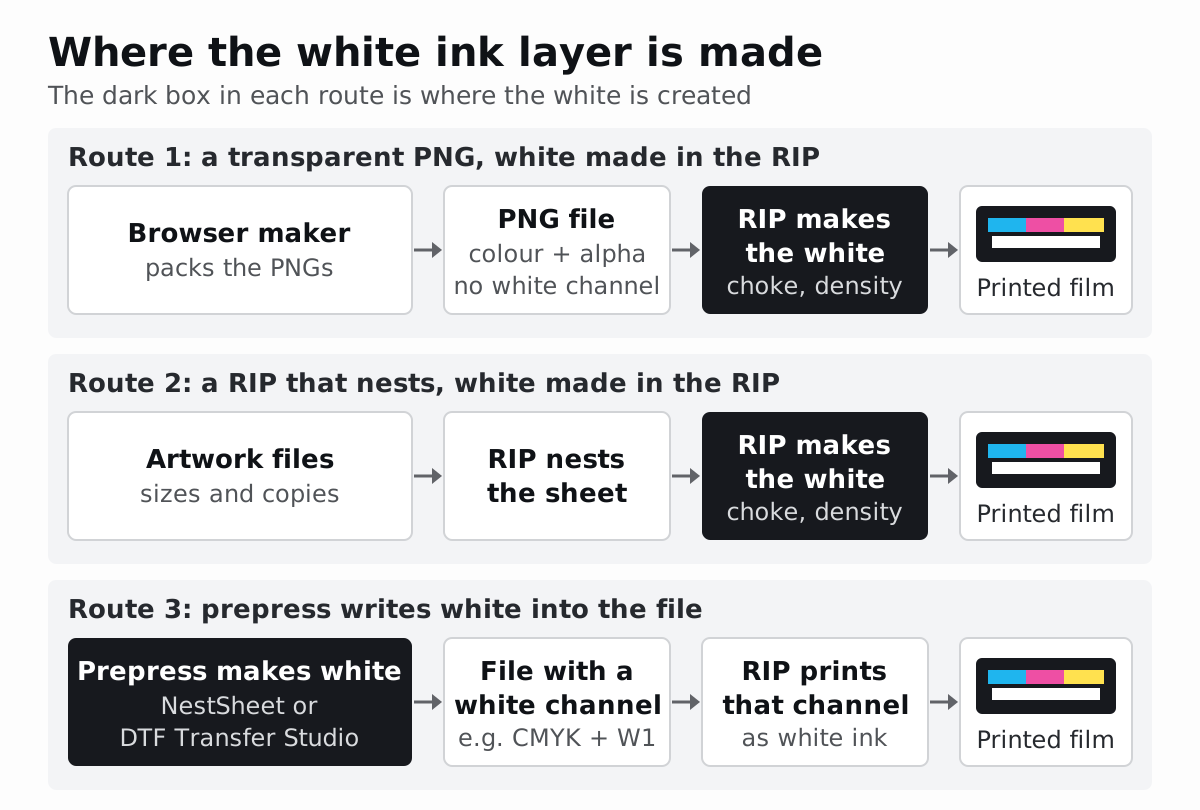
Route 1: a transparent PNG, white made in the RIP. The PNG format stores colour plus an optional alpha channel, the per-pixel transparency, according to the W3C PNG specification. It has no slot for a white ink channel. When a browser maker exports a transparent PNG, the RIP that opens it reads the transparency and generates the white, and the RIP’s settings decide choke and density. That is why the free makers’ pages can say nothing about white and still produce a printable sheet.
Route 2: a RIP that also nests. Digital Factory’s Queue menu has entries to “Set white choke”, set maximum white ink and set “how much white to use under black”, and its help describes a transparency tool that “is editing the underbase layer”. Flexi DTF Pro lets you preview and adjust the white underbase before printing and set its density, choke and bleed in the RIP. Layout and white then live in one program, next to the printer.
Route 3: white written into the file in prepress. DTF Transfer Studio adds a spot colour channel (its guide uses White as the example name) with an offset that makes the mask smaller (a negative value) or larger (a positive value) than the graphic. In raster mode the spot colour is “burned” into the image for PNG, TIFF or JPG; vector mode needs PDF, and its TIFF export keeps spot channels “experimentally”. NestSheet creates one W1 channel from each design’s transparency at 300 dpi, applies the whole-sheet choke of 0, 1 or 2 px (2 px by default) during export and protects qualifying thin details. Its TIFF carries five channels: C, M, Y, K and W1. The RIP is then set to print that channel as white instead of generating its own.
By hand in design software. Photoshop users draw the underbase as a spot channel, or convert an existing alpha channel into one. Adobe’s help says to save the file as PSD or TIFF to export spot channels, and to name spot colours so that other applications reading the file recognise them.
Pick one place where white is made and choked, and write it on the job record. If the file arrives with a white channel, the RIP should print that channel; if it arrives as a plain PNG, the RIP’s white settings are the only white settings. A choke in pixels only has meaning at a known resolution: at 300 dpi one pixel is 25.4 ÷ 300 = 0.0847 mm, so 2 px is about 0.169 mm.
Soft shadows, glows and feathered edges are where the routes differ most, because a program that makes white from transparency has to decide which partly transparent pixels get white. The guide to semi-transparent pixels in DTF shows what each alpha value turns into on film.
Which free gang sheet maker should you use?
The four free browser makers from the types table let you size, pack and export a sheet without paying first. They differ in what “free” covers, which roll widths they offer and whether anything leaves your computer.
| Tool | Free allowance | Roll widths | Files leave your computer? | Export | Paid step |
|---|---|---|---|---|---|
| Free Gang Sheet Maker | No account; “no limits” | 13, 17, 22, 24 or 30 in | No: “your artwork never leaves your browser” | 300 DPI PNG; long layouts become pages in a ZIP | Embed for shop websites, $49 or $99 per month |
| SheetBuilder | Unlimited for personal and non-commercial use | Any custom width and height | No: “Runs entirely in your browser” | PDF, or PNG at 72, 150, 300, 600 or 1200 DPI | $29 one-time licence to “Use output commercially” |
| DTFBuild | 50 completed exports per month, no card | 30 cm and 60 cm presets, or custom | Artwork stays local; each design’s size, quantity and “a simplified outline” go to its server | Transparent PNG at 72, 150 or 300 DPI, or PDF | Starter and Pro plans, monthly or per year |
| DTF Gang Sheet Builder | 3 exports; building is unlimited | 13, 17, 22 or 24 in; length fitted automatically or fixed up to 240 in | No: “Nothing uploads while you build” | 300 DPI transparent PNG | Pro at 19 USD per month: unlimited exports, any width, PDF |
For metric shops: 13 in is 330.2 mm, 17 in is 431.8 mm, 22 in is 558.8 mm, 24 in is 609.6 mm and 30 in is 762 mm (1 in = 25.4 mm). A 600 mm film is 23.62 in wide, which none of the inch presets matches, so SheetBuilder’s and DTFBuild’s custom widths, or DTF Gang Sheet Builder Pro’s, are the way to enter it exactly. DTF Gang Sheet Builder’s 240 in limit is 6,096 mm, just over 6 m.
Choose by the condition that matters to your shop:
- Free Gang Sheet Maker if you want no account and no export cap, and your film is one of its five widths. Its “Smart nesting” also tucks designs into each other’s transparent space.
- SheetBuilder if you need a custom width or a PDF. Its pricing table limits the free tier to personal and non-commercial use and sells the $29 commercial licence, while its FAQ calls commercial DTF work free; read the licence before relying on the free tier for paid work.
- DTFBuild if you want 60 cm presets, JPG or WebP input, a Mac or Windows app that saves sheets into your RIP’s hot folder, or store tools. Check that 50 completed exports a month covers your volume.
- DTF Gang Sheet Builder if you want a quick 300 DPI PNG on a standard inch roll. After three exports, Pro removes the cap and adds custom widths and PDF.
None of the four pages describes the white layer; their stated outputs are PNG or PDF sheets. Plan for your RIP to make the white (route 1 above) and check its white preview before printing. Clean stray semi-transparent pixels in the source artwork before packing; of these four, DTFBuild’s pages list a separate Design Editor with background removal, halftone, upscaling and trimming.
How does auto-nesting differ between tools?
Auto-nesting means the software places every copy on the sheet for you. Ten tools here state it, but they differ in four ways that change how much film a sheet uses.
- The shape that gets packed. DTF Gang Sheet Builder, SheetBuilder and NestSheet pack each design’s bounding rectangle, so every copy sits in a clear rectangle of its own. Free Gang Sheet Maker’s “Smart nesting” fits designs into each other’s transparent space, and DTFBuild sends “a simplified outline” of each design to its layout server. Nesting by the artwork’s outline can pull round or irregular shapes closer together.
- Rotation. DTF Gang Sheet Builder offers optional 90° rotation, DTFBuild rotates 90° automatically and Digital Factory turns a job in 90-degree steps. SheetBuilder tries each image upright and rotated, and Free Gang Sheet Maker notes that a copy turned 180° can fill another design’s gap. Where orientation matters for cutting or sorting, place those pieces by hand.
- Trimming empty borders. Transparent canvas around a design is packed as if it were artwork. Free Gang Sheet Maker has Trim, Digital Factory has auto-crop with a threshold for which pixels count as transparent, and DTF Transfer Studio has Trim transparency. NestSheet finds artwork bounds using pixels with alpha above 10 on the 0–255 scale and trims when those bounds reduce either dimension by more than 2 %; a stray faint pixel far from the art enlarges the bounds.
- Spacing and overflow. Gap is the space between designs; margin is the clear strip at the film edge. Digital Factory sets spacing between jobs and between copies, DTFBuild allows a 0–20 mm gap, and Free Gang Sheet Maker calls 0.125 to 0.25 in (3.2 to 6.4 mm) typical. When an order outgrows one sheet, Free Gang Sheet Maker splits it into pages in a ZIP, DTF Transfer Studio and Build a Gang Sheet’s Auto Build create more sheets, and DTF Gang Sheet Builder reports unplaced pieces when the length is fixed.
Treat film-saving percentages on vendor pages as the vendor’s own figures, not a forecast for your orders, and measure sheet length on your own order with the test below. If your RIP already nests, compare it with a separate tool on that same order; the RIP built-in nesting comparison lists what to record.
Which gang sheet software fits your shop?
Start from the job your shop does most often, not from the longest feature list.
| If your shop… | Start with | Why, from the vendor’s pages | Check before committing |
|---|---|---|---|
| Orders transfers from a supplier and builds a sheet now and then | Free Gang Sheet Maker or SheetBuilder | Free, no account, files stay in the browser | The supplier’s roll width and file rules; SheetBuilder’s licence for paid work |
| Sells gang sheets online and wants customers to lay them out | Build a Gang Sheet, or the Free Gang Sheet Maker embed | Customers build in your store and you receive one file | 5% per fulfilled sheet (at most $12 per order) against $49 or $99 per month, at your order volume |
| Already runs Digital Factory 12 or Flexi DTF Pro | The RIP’s own gang sheet tool | Nesting, white and printing in one queue | Whether its layout handles your mixed orders without hand edits |
| Edits, halftones and adds cut paths on one offline workstation | DTF Transfer Studio | Desktop and offline; white spot channel with an offset; PDF cut paths | TIFF spot channels are marked experimental, so test the RIP import |
| Builds every sheet by hand in Photoshop | Photoshop for the art, a nesting tool for the layout | Spot channels and placement are manual in Photoshop | Sheet length and setup time, hand layout against automatic |
| Prints through MainTOP and wants white and choke settled before the RIP | NestSheet | Browser; CMYK + W1 TIFF at 300 dpi, mirrored; whole-sheet choke | The W1 mapping in your MainTOP queue |
| Wants sheets to land in a RIP hot folder | The DTFBuild desktop app | Saves each downloaded sheet into the folder the RIP watches | Generating sheets needs an internet connection |
Each storefront, RIP, desktop and Photoshop row has a fuller head-to-head: customer storefront builder against operator prepress, a RIP’s built-in nesting against a separate tool, DTF Transfer Studio against browser prepress and hand-built Photoshop sheets against automatic layout. Prepress-only candidates that are not in this table, such as DTFGSA and PigmentaLab, are covered in the DTF prepress software roundup.
On Fiery’s product page the Digital Factory DTF Desktop Edition is for printers up to A2 or 18 in (45.72 cm) roll width, and its shop places the Production Edition at 24 in (60 cm) rolls and wider. A 60 cm DTF printer therefore points to the Production Edition, listed from $945.
How do you test gang sheet software on the same file?
A fair test changes only the tool. Use one real, approved order and the settings you actually print with.
- Pick one approved order with mixed sizes, one soft edge and the finest text you accept. An example: 4 full fronts at 11 × 11 in (279.4 × 279.4 mm), 12 left-chest logos at 3.5 × 2 in (88.9 × 50.8 mm) and 6 back-neck prints at 2 × 2 in (50.8 × 50.8 mm). Give one design a 50% drop shadow and another small lettering. The DTF transfer size chart lists placement sizes.
- Fix the sheet settings. Use the same printable width, gap, margin, rotation rule and 300 DPI everywhere. Convert once: a 600 mm roll is 23.62 in, a 2 mm gap is 0.079 in and a 5 mm margin is 0.197 in. A tool without a margin field gets the printable width instead: 600 − 2 × 5 = 590 mm (23.23 in). If a tool offers only inch presets, choose a width every tool can set, such as 22 in (558.8 mm).
- Build the sheet in each tool with automatic layout and no hand edits, then count copies against the order: 22 pieces in the example.
- Record length and film area. Film area = roll width × sheet length, because you pay for the full width. In plain rows with a 2 mm gap and 5 mm margins, the example needs about 729 mm on a 600 mm roll: two rows of full fronts (560.8 mm), two rows of six logos (103.6 mm), one row of back-neck prints (50.8 mm), 4 mm of gaps between groups and 10 mm of margins. If one tool returns 730 mm and another 780 mm, the areas are 0.6 × 0.73 = 0.438 m² and 0.6 × 0.78 = 0.468 m²: 50 mm of roll, or 0.03 m², per sheet.
- Export the file you would print and open it in your RIP. Check the physical size (730 mm should open as 28.74 in), the mirror state, and where white comes from: a channel in the file, or the RIP’s own generation.
- Inspect the white edge around the shadow and the lettering, in the file’s white channel if it has one, otherwise in the RIP’s white preview. Note which choke applied; at 300 dpi, 1 px is 0.0847 mm.
- Print one short strip with the shadow and the lettering, press it on your best-selling garment and check for a white rim, lost detail and missing copies.
- Price last. Apply each price model to your volume (for example, 5% of a $25 sheet is $1.25 per fulfilled sheet) and add the operator minutes each route took.
| Keep fixed across tools | Record for each tool |
|---|---|
| Artwork files and versions, sizes, copies | Copies placed and missing |
| Printable width, gap, margin, rotation rule | Sheet length (mm) and film area (m²) |
| 300 DPI export resolution | File type, channels, size as opened in the RIP |
| RIP, queue and white settings | Where white was made, and its choke |
| Film, ink, powder and press settings | White rim, detail loss, operator minutes |
The result you can trust: every copy present, the shortest correct sheet, and a white edge that passes the printed strip at a price that fits your volume. Repeat the test whenever a tool or RIP version changes.
Where does NestSheet fit, and what does it cost?
NestSheet is browser-based DTF prepress for print shops. It follows route 3 above for shops that print through MainTOP, and route 1 for RIPs that make white from a transparent PNG. Upload transparent PNG artwork (up to 100 MB per file), set each design’s print size and copies, and choose a roll width: presets of 300, 400, 600, 900, 1200, 1600 and 1800 mm, a custom width, or A4, A3 and A2 sheets. A new sheet starts 600 mm wide with a 2 mm gap, a 5 mm margin and automatic height. Auto-nest packs the designs at 0° or 90°, or you place them by hand in Manual. Choose a whole-sheet choke of 0, 1 or 2 px (2 px by default) and export the Production DTF preset: a mirrored 300 dpi TIFF with CMYK and one W1 white channel, five channels in all, for MainTOP. For a RIP that builds white from transparency, export a 300 dpi PNG with transparency instead. A switch sets mirroring for either format; by default the TIFF is mirrored and the PNG is not. Completed exports stay downloadable for 72 hours by default.
NestSheet is free during early access, with every feature included and unlimited exported area. Paid plans will come later, registered users will be emailed at least 30 days before any paid plan applies to them, and the pricing page has the details. To compare it with the tools above, pack your own approved order with Auto-nest using the same-file test.
Sources
Vendor pages checked 9 October 2026. The old CADlink product address redirects to Fiery’s Digital Factory page.
- Fiery, Digital Factory – Direct To Film Edition and Fiery Shop: Digital Factory Direct To Film Production Edition: https://www.fiery.com/products/digital-factory-dtf/ and https://shop.fiery.com/product/digital-factory-direct-to-film-production-edition/
- Fiery Digital Factory help, Gang Sheet Builder, Queue Menu and Transparency Opacity Tool: https://help.cadlink.com/website/digital_factory/en/production/menus/gang_sheets.htm and https://help.cadlink.com/website/digital_factory/en/production/menus/queue_menu_output.htm and https://help.cadlink.com/website/digital_factory/en/bonus_documentation/transparency_opacity_tool.htm
- SAi, Flexi DTF Pro and SAi Subscriptions: Flexi DTF Pro: https://www.thinksai.com/products-flexi-dtfpro/ and https://saisubscriptions.com/products/flexi_dtf_pro/fp-dtf-pro-sai-global
- AcroRIP, Features and Where to buy: https://acrorip.com/features.php and https://acrorip.com/where-to-buy.php
- Maintop Technology Development, Download center and Products: https://www.maintop.com.cn/?supports=supports&lang=en and https://www.maintop.com.cn/?details=maintop-rip-industry&lang=en
- DTF Gang Sheet Builder, home page and Pricing: https://dtfgangsheetbuilder.com/ and https://dtfgangsheetbuilder.com/pricing
- Free Gang Sheet Maker, home page and Embed licensing: https://freegangsheetmaker.com/ and https://freegangsheetmaker.com/embed/
- DTFBuild, home page, Pricing and Desktop app: https://dtfbuild.com/ and https://dtfbuild.com/pricing and https://dtfbuild.com/desktop
- Glare Studios, SheetBuilder: Auto-Pack Sheet Layout Builder: https://sheetbuilder.net/
- Drip Apps, Build a Gang Sheet app listing, Auto Build and Gang Sheet File Type guides: https://apps.shopify.com/build-a-gang-sheet and https://buildagangsheet.io/a/docs/standalone/builder-settings-custom-auto-build-onoff and https://buildagangsheet.io/a/docs/standalone/gang-sheet-settings-standalone-gang-sheet-file-type
- DTF Transfer Studio, Pricing and Documentation: https://dtftransferstudio.com/pricing/ and https://dtftransferstudio.com/documentation/
- Adobe, Print with spot colors from Photoshop: https://helpx.adobe.com/photoshop/using/printing-spot-colors.html
- W3C, Portable Network Graphics (PNG) Specification (Third Edition): https://www.w3.org/TR/png-3/
- NestSheet, Pricing: https://nestsheet.com/pricing