Auto-nesting
Auto-nesting for DTF gang sheets.
Drop the order in and the packer lays out the sheet: MaxRects placement with 0/90° rotation, your gap and margin honoured, on the roll you actually run — with the film readout on screen the whole time.
The engine
What the packer actually does.
Not a shelf-stacker — a MaxRects solver with a batching trick on top.
- Identical copies are grouped into row blocks — “SuperRectangles” — before packing, so ×20 of one design lands as tidy rows a slitter can follow, not confetti.
- The solver tries four placement heuristics against six sort orders and keeps the tightest layout — you never pick an algorithm, you get the best attempt.
- Pieces rotate 0° or 90° when it wins space. Free-angle rotation is not how DTF sheets get slit and pressed, so we don’t pretend to it.
- Three refinement passes run after the main pack: a last-row tidy-up, pairwise swaps, and strip compaction.
- Gap and margin are honoured exactly — 2 mm between pieces and 5 mm off the edges by default, both yours to change.
One real sheet
The same batch, by hand and by the packer.
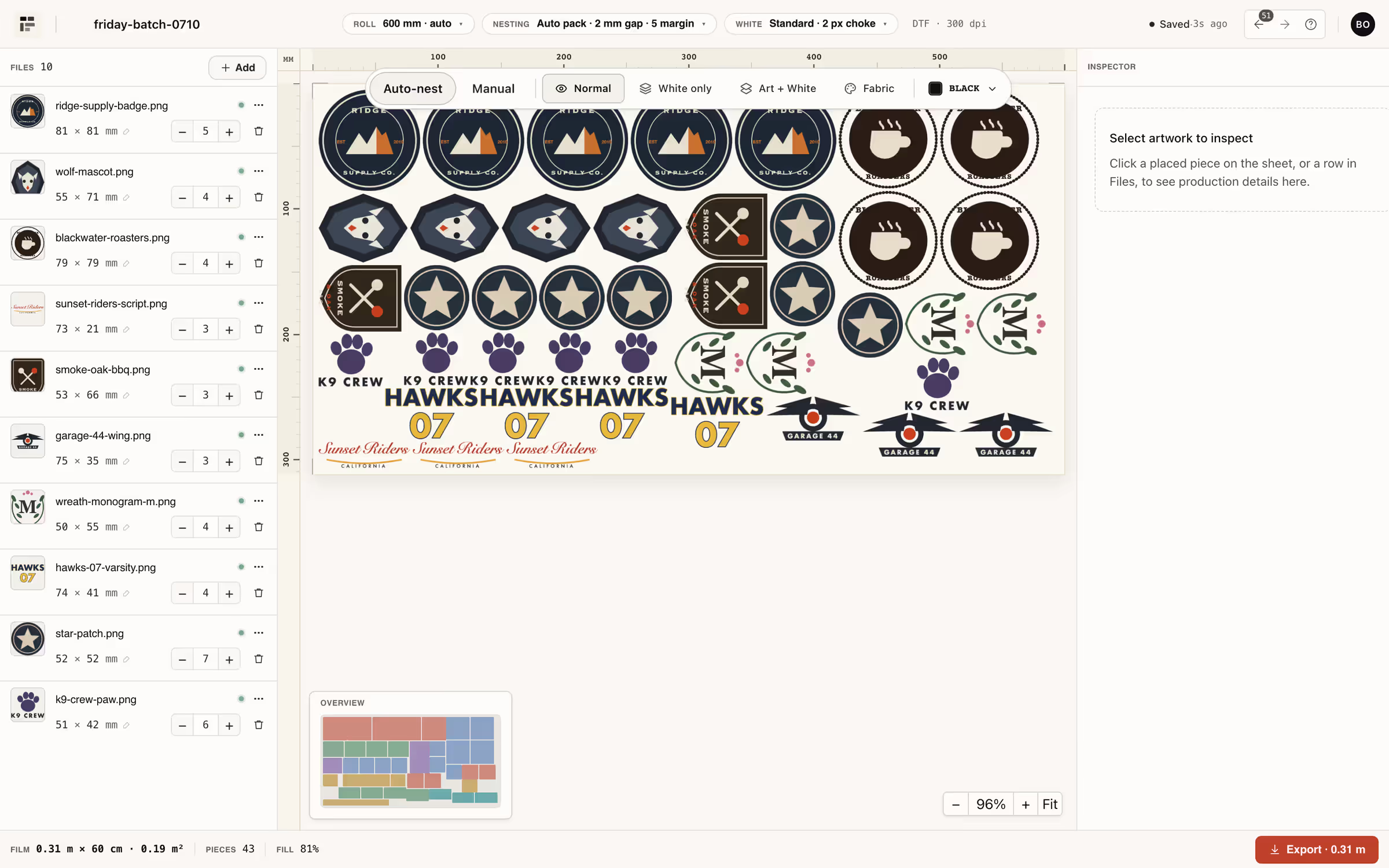
Ten files, 43 pieces, one 600 mm roll. The hand-laid grid used 0.72 m of film; the auto-pack closed the same batch at 0.31 m. One real sheet, not an average.
You will notice there are no utilisation percentages on this page. That is deliberate: a public benchmark — with the method and the dataset published next to the results — has to come first. What we can show today is a sheet you can reproduce yourself: put a real order folder through the free plan and read the film numbers off your own layout.


Your hands on it
Auto-nest is a mode, not a cage.
- Auto-nest is on by default; switch to Manual and drag when a job wants your judgement — the packer never overrules a hand you’ve placed in Manual.
- Per-file copy counts live in the files rail — bump a design to ×6 and the sheet repacks around it.
- Film length, m² and fill stay on the ticket while you work, so the cost of a layout is never a surprise at export time.
- Roll presets from 300 to 1800 mm plus A4/A3/A2 sheets — or a custom sheet up to 2000 × 10000 mm.
- Sheet height grows with the batch automatically (default roll 600 mm) — you cut the film the order needs, not the length you guessed.
Utilisation
How we measure utilisation — and why there’s no number here.
Utilisation is plain arithmetic: artwork area divided by the film area the sheet actually uses. Change the gap, the margin, the roll width or the mix of piece sizes and the number moves — which is exactly why a single marketing percentage would tell you nothing about your shop.
We are preparing a public benchmark — real order batches, a hand-laid baseline, method and dataset published alongside the results. Until it ships, this site quotes no utilisation figures. Measure your own instead: nest a real order on the free plan and read the sheet, or put your film price into the film savings calculator to see what each point of waste costs in money.
Spec sheet
The nesting parameters, from the code.
Every value below is read from the shipped product, not from a wishlist — the sources are in this page’s code.
| Parameter | As shipped |
|---|---|
| Placement engine | MaxRects + SuperRectangles grouping |
| Attempts per pack | 4 placement heuristics × 6 sort orders — tightest kept |
| Rotation | 0° / 90° |
| Gap between pieces | 2 mm default, adjustable |
| Sheet margin | 5 mm default, adjustable |
| Roll presets | 300 / 400 / 600 / 900 / 1200 / 1600 / 1800 mm |
| Fixed sheets | A4 · A3 · A2 |
| Custom sheet | up to 2000 mm wide × 10000 mm long |
| Sheet height | grows with the batch (auto, default on) |
| Modes | Auto-nest (default) / Manual drag |
FAQ
The questions operators actually search.
What is a gang sheet?
What size gang sheet do I need?
How many 10×10 images fit on a 22×60 gang sheet?
Can you reuse DTF film?
Keep going